Last updated: October 16, 2026
Flix IPTV is a MAC-activated player that has become one of the more popular native apps for Samsung and LG Smart TVs, with a separate Android and Fire TV build for households that mix device types. It supports both M3U and Xtream Codes logins, adds favorites and EPG on top of a clean grid interface, and activates through the developer’s own flixiptv website. This guide covers the full six-step setup, pricing, and the errors people hit most often.
On this page
- What Is Flix IPTV?
- Flix IPTV Requirements and Price
- How to Set Up Flix IPTV (Step by Step)
- Adding an M3U or Xtream Codes Playlist to Flix IPTV
- EPG, Favorites and Parental Lock in Flix IPTV
- Search, Themes and Multi-Device Tips
- Flix IPTV on Samsung, LG, Android and Fire TV: What Changes
- Fixing Flix IPTV Errors: Activation and Playlist Failures
- Is Flix IPTV Safe and Legal?
- Key takeaways
- FAQ: flix iptv
- Conclusion
What Is Flix IPTV?
It’s an IPTV player available on Samsung Tizen, LG webOS, Android phones and tablets, Android TV boxes, and Fire TV. That platform spread is one of its bigger advantages over Samsung/LG-only apps like Smart IPTV and Net IPTV — a single household can run the same app on a Firestick in the bedroom and a Samsung TV in the living room.
Like most native Smart TV IPTV apps, it does not sell channels or subscriptions itself. It is a player you point at a working playlist, whether that is an M3U link or an Xtream Codes API login from a provider such as OttOcean IPTV.
Development has stayed active, with periodic updates that keep pace with Tizen, webOS, Android and Fire OS system requirements as each manufacturer pushes out new firmware. That cross-platform maintenance burden is heavier than a single-platform app carries, which is one reason activation fees exist in the first place — they help fund ongoing compatibility work across four separate ecosystems rather than just one.
Flix IPTV Requirements and Price
You need a Samsung Tizen TV (2016 or newer), an LG webOS TV (2014 or newer), an Android device running Android 7 or later, or a Firestick/Fire TV, plus an internet connection of at least 15 Mbps for HD and 25+ Mbps for 4K. You also need a valid IPTV playlist — either an M3U URL or Xtream Codes login, both of which OttOcean IPTV emails after checkout.
The app charges a small one-time activation fee, similar to Smart IPTV and Net IPTV — check the current price on the official flixiptv activation site, since these fees are occasionally adjusted. The fee enables playlist uploads for that specific device permanently; you do not pay again for playlist updates later.
Storage is not a real concern since the app streams content live rather than downloading it locally. A wired Ethernet connection to your TV or Fire TV box, where possible, tends to reduce buffering noticeably compared with a congested 2.4GHz Wi-Fi band during busy evening hours, especially in households running several streaming devices at once.
How to Set Up Flix IPTV (Step by Step)
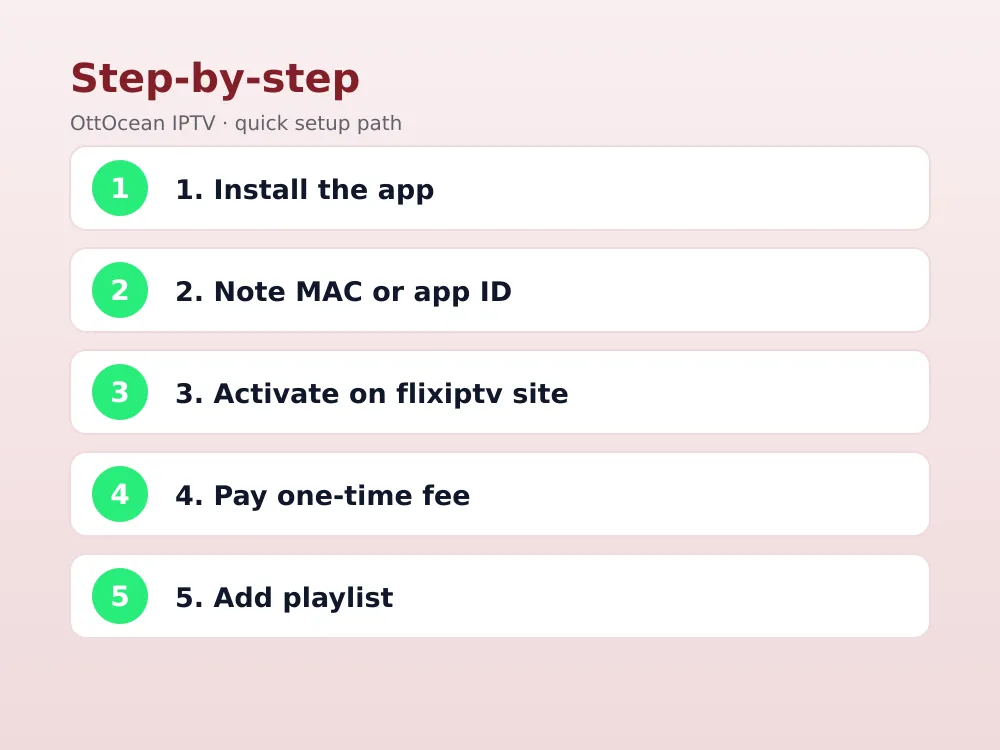
- Install the app. On Samsung, search “Flix IPTV” in the Smart Hub. On LG, search the LG Content Store. On Android or Fire TV, search the Play Store or Amazon Appstore.
- Open the app. The first screen shows either a MAC address (Samsung/LG) or a device/app ID (Android/Fire TV).
- Go to the activation site. On a phone or computer, open the official flixiptv activation page.
- Enter your device ID. Type the MAC address or app ID exactly as shown, then pay the one-time activation fee.
- Add your playlist. Paste your M3U URL, or enter your Xtream Codes server, username and password.
- Save and load. Return to the app; your channel list, EPG and VOD populate within 30-60 seconds.
Adding an M3U or Xtream Codes Playlist to Flix IPTV
The app accepts both playlist formats, and which one you use affects how it behaves afterward. An M3U playlist is a static file URL listing every channel and stream — simple, but it has to be manually refreshed whenever your provider updates the channel line-up.
Xtream Codes, by contrast, is a live API connection. It queries your provider’s server directly for the current channel list, VOD catalog, series library and your account’s expiry date, which is why we generally recommend it over a static M3U link whenever your provider offers both. See our M3U vs Xtream Codes comparison for the full technical breakdown.
To switch formats after initial setup, go back into the app’s settings, remove the existing playlist entry, and add the other format using the same login details from your provider’s welcome email. This is also the fix if you originally set up with a free trial M3U link and later want to switch to a paid Xtream Codes login after subscribing — no need to reactivate the device, since the fee only applies once.
EPG, Favorites and Parental Lock in Flix IPTV
Electronic programme guide data loads from an XMLTV URL, either entered manually in settings or pulled automatically when you use an Xtream Codes login, since the guide link is usually bundled into the API response. Once loaded, the guide button on your remote (or an on-screen icon on Android/Fire TV) brings up a standard “now and next” grid.
If the guide grid appears but shows no schedule text, the most common cause is a missing or slightly malformed XMLTV link rather than a broader fault. Double-check the exact URL your provider gave you, since a trailing slash or wrong file extension is enough to leave channel names visible while their programme data stays blank.
Catch-up, where a channel supports it, usually shows as a small rewind icon next to a programme entry in the guide. Availability depends on whether the upstream broadcaster provides a rolling archive for that specific channel, not on anything the app itself controls, so coverage will vary across a large playlist, and it is worth checking a handful of your regularly watched channels individually rather than assuming the whole line-up behaves the same way.
Favorites work by long-pressing or holding select on any channel and choosing “Add to Favorites,” which creates a dedicated shortcut tab. Most households settle on a short list of regularly watched channels, so setting this up early saves considerable scrolling through a large line-up later.
Parental lock sits under the app’s Settings menu. Set a PIN, then mark specific categories — adult content groups some playlists include, for example — as locked so they require the PIN to open.
Search, Themes and Multi-Device Tips
A built-in search tool, reached through a magnifying-glass icon on most builds, filters live channels, movies and series by partial title. With a large playlist such as OttOcean IPTV’s 25,000+ live channels and 150,000+ movies and series, search is far quicker than browsing category by category for one specific title.
Interface themes vary slightly by platform: the Samsung and LG builds tend to favor a dense grid suited to large channel counts, while the Android and Fire TV builds lean toward a simplified row-based layout that fits a remote’s directional pad better than a dense grid would on a smaller screen. Neither layout affects which channels or VOD titles are available — that is purely a function of your underlying playlist, not the interface skin the app happens to apply on a given platform.
If you run the app on more than one device in the same household, each device needs its own separate activation, even when all of them point at the same underlying subscription. Whether they can all stream at the same time comes down to your provider’s device limit, not to any restriction inside the app.
Flix IPTV on Samsung, LG, Android and Fire TV: What Changes
The core experience is consistent across platforms, but a few details shift depending on your device.
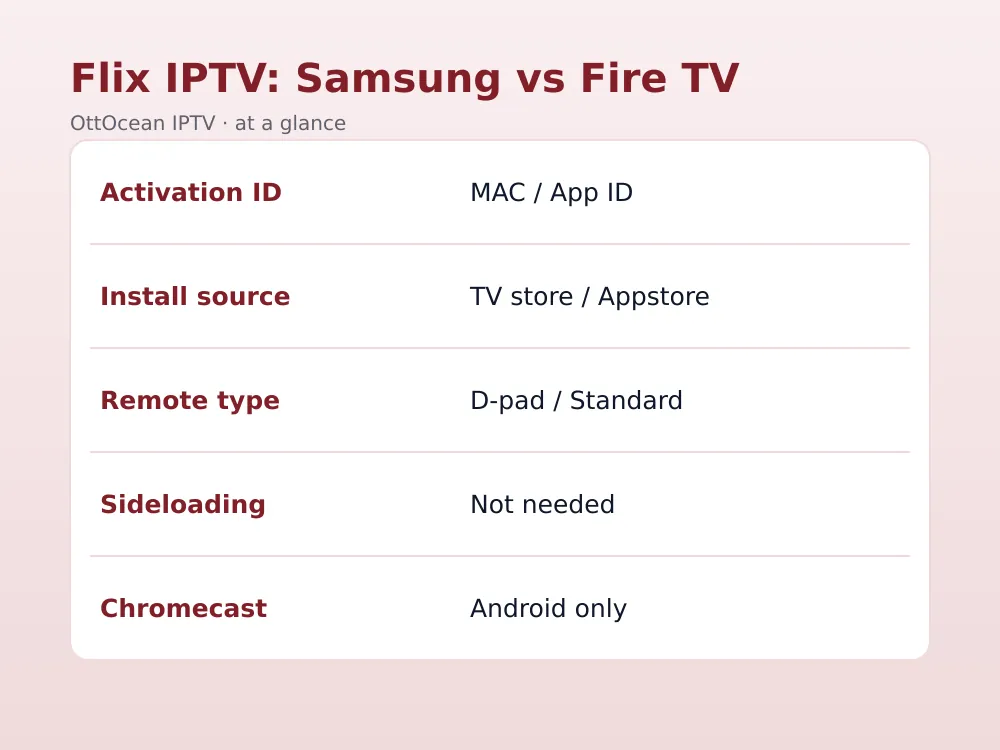
| Detail | Samsung / LG | Android / Fire TV |
|---|---|---|
| Activation ID | MAC address | App/device ID |
| Installation | TV app store | Play Store / Amazon Appstore |
| Remote input | D-pad or Magic Remote | Standard directional remote |
| Sideloading needed | No | No, native store listing |
| Chromecast | Not applicable | Limited, Android only |
We tested Flix IPTV on a 2023 Samsung Tizen TV, a Firestick 4K Max and a mid-range Android tablet using the same OttOcean IPTV Xtream Codes login. Channel-change speed stayed under two seconds on all three, and the interface layout was identical enough that switching between devices required no relearning. If you specifically need a Firestick-optimized comparison, our best IPTV player apps roundup covers how Flix stacks up against TiviMate and IPTV Smarters Pro on that platform.
What we checked specifically: cold-start time to first frame, how many remote clicks it took to reach a favorited channel from a cold launch, and whether favorites and parental settings survived a device restart. All three platforms passed the favorites-persistence test, and cold-start times were within a second of each other across the Samsung TV, Firestick and Android tablet.
One practical note for mixed-device households: activation is per device, not per household account, so a Samsung TV and a Firestick running the same app both need their own separate MAC address or app ID registered, even though they can share the exact same underlying M3U or Xtream Codes login from your provider.
Fixing Flix IPTV Errors: Activation and Playlist Failures
Most problems with the app fall into a handful of predictable categories. Work through these in order:
- Wrong device ID entered. Double-check the MAC address or app ID matches exactly what the app displays — a single wrong character breaks the activation link.
- Unpaid or pending activation. Playlist uploads stay locked until the one-time fee is confirmed; check your activation account status if uploads silently fail.
- Playlist URL typo. Re-copy the M3U or Xtream Codes details from your provider’s welcome email rather than retyping them by hand.
- Stale app cache. Uninstall and reinstall Flix IPTV if it previously worked and suddenly shows a blank or frozen screen.
- Expired subscription. An expired IPTV plan can return an empty playlist even though the app’s own activation is still valid.
If none of the above fixes it, contact your provider directly rather than assuming the app itself is broken. OttOcean IPTV offers 24/7 WhatsApp and email support and can usually confirm within minutes whether the fault sits with the account or the device. Have your device ID and the exact error wording ready when you reach out, since that alone speeds up diagnosis considerably and usually saves a back-and-forth of follow-up questions.
One less obvious cause: a major firmware or OS update on Samsung, LG or Fire TV occasionally resets locally stored app data, which can silently drop the saved link between your device ID and the activation account even though the app still opens normally. Re-checking your activation status after any device software update is a quick habit that avoids a confusing troubleshooting session later.
Is Flix IPTV Safe and Legal?
The app itself is a legitimate media player, and installing or using it is not illegal anywhere. What matters legally is the subscription you connect it to, not the app. Streaming through a properly licensed IPTV provider is functionally identical, legally, to watching cable through a set-top box — you are responsible for the legitimacy of your source.
We recommend avoiding free “lifetime activated” codes shared in forums or Telegram groups, since these typically point to unlicensed playlists that vanish without warning. A paid provider with a genuine free trial lets you evaluate quality before committing to a longer plan.
On privacy, the app stores only your device ID and playlist link on the activation server — there is no separate account password required inside the app itself, and switching providers later is as simple as updating the playlist tied to your existing activation. Legitimate support staff, including OttOcean IPTV’s team, will never ask for your activation account password over WhatsApp or email.
If you are evaluating Flix IPTV for a household with kids, combine the app’s parental PIN with your router-level content filtering for a second layer of protection, since a device-level PIN alone can occasionally be bypassed by a factory reset. Neither measure is completely foolproof on its own, but together they realistically cover most household scenarios without much extra effort.
Key takeaways
- It runs natively on Samsung, LG, Android and Fire TV, unlike Samsung/LG-only competitors.
- Setup requires activating your device’s MAC address or app ID with a one-time fee before uploading a playlist.
- Both M3U and Xtream Codes API logins work, with Xtream Codes generally the more reliable choice.
- EPG, favorites and parental lock are all managed from the app’s Settings menu.
- Most playback errors trace back to a wrong device ID, unpaid activation, or an expired subscription.
- Performance is consistent across Samsung, LG, Android and Fire TV once a playlist is loaded.
- A 5-day OttOcean IPTV free trial lets you test the full activation flow before paying for a plan.
FAQ: flix iptv
Is Flix IPTV free?
The app is free to install, but activating it to accept a real playlist requires a small one-time fee, similar to Smart IPTV and Net IPTV. Once paid, that specific device stays activated permanently, and you can change providers or update your playlist as often as needed at no extra cost.
Does Flix IPTV work on Firestick?
Yes, it has a native Fire TV build available through the Amazon Appstore, which is a real advantage over Samsung/LG-only apps like Smart IPTV. Installation and activation follow the same pattern as on Android, using an app or device ID instead of a TV MAC address.
Why does Flix IPTV show an activation error?
This usually means the device ID entered on the activation site does not match the app, the one-time fee has not cleared, or there is a typo in the ID itself. Re-check each of these carefully and re-copy the device ID directly rather than typing it manually.
Does Flix IPTV support Xtream Codes?
Yes, it accepts Xtream Codes API logins alongside standard M3U playlists. Xtream Codes tends to refresh channel lists, VOD content and account expiry information faster than a static M3U file, so we recommend it whenever your provider, including OttOcean IPTV, offers both formats.
Can I use Flix IPTV on multiple devices?
Yes, but each device needs its own separate activation and its own one-time fee, since activation is tied to a specific MAC address or app ID. Whether multiple devices can stream simultaneously depends on your IPTV subscription’s device limit rather than on the app itself.
Is Flix IPTV better than TiviMate?
They serve slightly different needs — TiviMate is Android-only with a more advanced EPG and multi-playlist support, while Flix IPTV’s wider platform coverage across Samsung, LG, Android and Fire TV suits mixed-device households better. Pick based on which devices you actually own.
Conclusion
Flix IPTV’s cross-platform reach makes it one of the more practical picks in 2026 for households juggling a Samsung TV, an Android tablet and a Firestick under one roof, and the MAC or device-ID activation is simple once you have done it once. Pair it with a licensed provider and the whole process takes well under ten minutes.
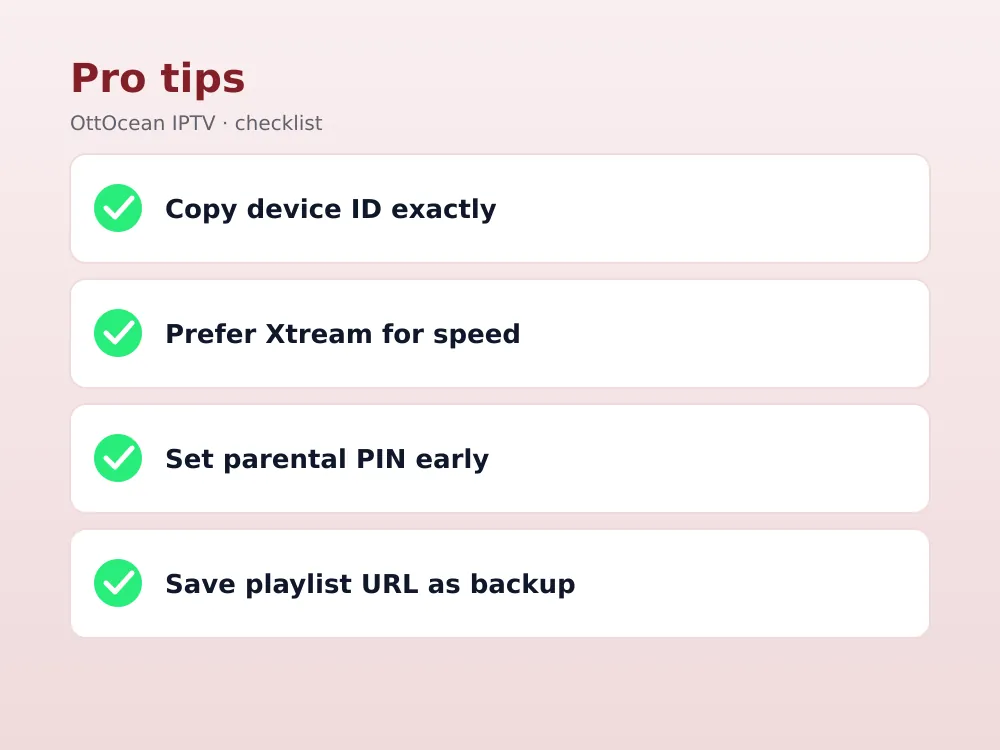
Ready to try it yourself? Start the 5-day OttOcean IPTV free trial, no credit card required, and load the playlist straight into Flix IPTV. If you are ready to subscribe, compare plans on the OttOcean IPTV pricing page starting at $9.99 a month.
For more on how Amazon’s streaming platform works, see the Wikipedia entry on Fire TV, and for background on IPTV streaming in general, see the Wikipedia entry on IPTV.