Last updated: October 15, 2026
Net IPTV is a MAC-address-activated player for Samsung and LG Smart TVs, built and distributed through netiptv.eu, and it works almost identically to the better-known Smart IPTV (SIPTV) app. If your TV app store already has Net IPTV installed, or you were told to use it specifically by your provider, this guide covers the full five-step setup on Samsung and LG, plus the differences from SIPTV and IBO Player worth knowing before you commit.
On this page
- What Is Net IPTV?
- Net IPTV Requirements Before You Start
- How to Set Up Net IPTV (Step by Step)
- Adding a Playlist to Net IPTV by MAC Address
- EPG, Parental Controls and Channel Groups in Net IPTV
- Favorites, Search and Multi-Screen Tips
- Net IPTV vs Smart IPTV (SIPTV) vs IBO Player
- Fixing Net IPTV Errors: Blank Channels and Activation Failures
- Is Net IPTV Safe and Legal?
- Key takeaways
- FAQ: net iptv
- Conclusion
What Is Net IPTV?
It’s a native Tizen (Samsung) and webOS (LG) IPTV player distributed through netiptv.eu. It follows the same MAC-registration model pioneered by Smart IPTV: instead of typing a playlist URL on the TV remote, you register the TV’s unique MAC address on a companion website and manage everything from a browser.
The app has built a loyal following in Europe in particular, where several regional IPTV resellers bundle its activation codes directly with subscriptions. It is not exclusive to any one provider, though — like Smart IPTV, it works with any valid M3U playlist or Xtream Codes login, including OttOcean IPTV.
Development has stayed active over the years, with periodic interface updates that keep pace with Tizen and webOS system requirements as Samsung and LG push out new firmware. That ongoing maintenance is one reason resellers keep recommending it alongside newer alternatives rather than treating it as a legacy option.
Net IPTV Requirements Before You Start
You need a Samsung Smart TV running Tizen (2016 models or newer tend to work best) or an LG Smart TV running webOS (2014 models onward), a broadband connection of at least 15 Mbps for HD streaming, and a working playlist — either an M3U URL or Xtream Codes API login. OttOcean IPTV sends both in the welcome email after checkout, so either works here. If you are setting up a Samsung set specifically, our Samsung Smart TV setup guide covers the Tizen menu layout in more depth; LG owners should check our LG Smart TV setup guide for the equivalent webOS walkthrough.
You will also need a phone, tablet or computer browser to complete registration on netiptv.eu, since the TV app cannot register its own MAC address or process the activation payment on its own. Budget five to ten minutes total for the entire process the first time, including waiting for the netiptv.eu payment confirmation email, which usually arrives within a couple of minutes but can occasionally take a little longer during busy periods.
Storage is not a real concern, since streaming happens live rather than through local downloads. A wired Ethernet connection to the TV, where possible, tends to produce noticeably fewer buffering hiccups than a congested 2.4GHz Wi-Fi band during peak evening viewing hours, particularly in larger households running several streaming devices at once.
How to Set Up Net IPTV (Step by Step)
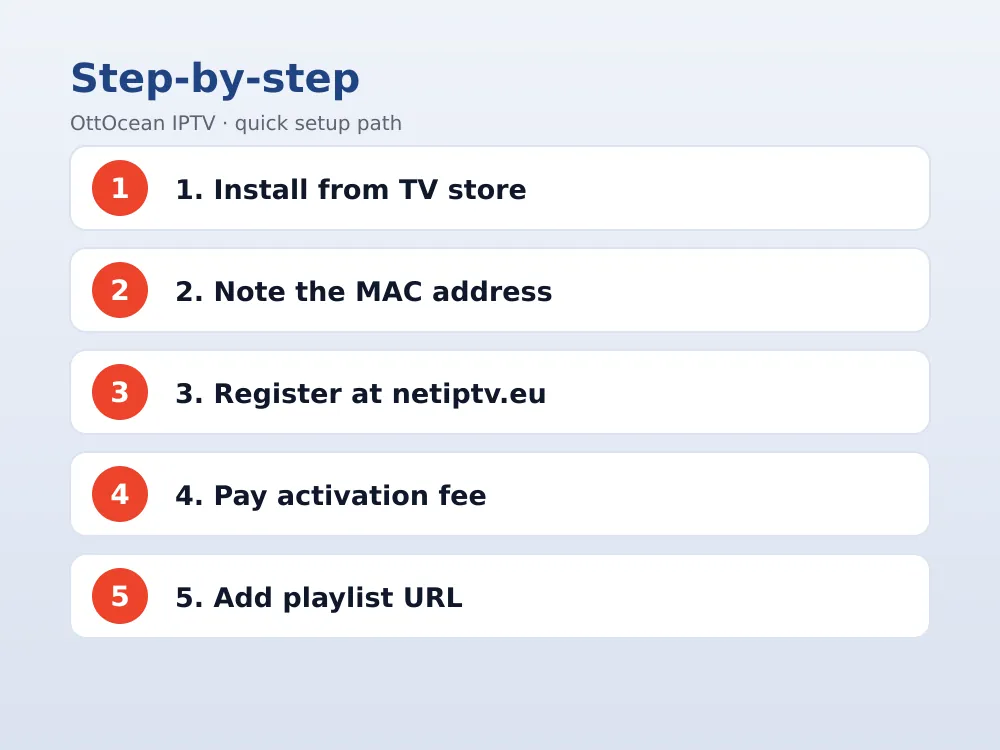
- Install the app. On Samsung, open Smart Hub and search “Net IPTV.” On LG, open the LG Content Store and search the same name.
- Note your MAC address. The app displays a unique MAC address on its first screen — write it down exactly as shown, including all colons.
- Register at netiptv.eu. On a browser, go to netiptv.eu, create an account if needed, and enter the MAC address from step 2.
- Pay the activation fee. The app charges a small one-time fee (check netiptv.eu for current pricing) to enable playlist uploads for that specific MAC address.
- Add your playlist. Paste your M3U URL, or enter your Xtream Codes server, username and password, then save.
Adding a Playlist to Net IPTV by MAC Address
The MAC-based approach is the single most confusing part of this setup for first-time users, so it is worth slowing down here. Every install has a unique MAC address tied to that specific TV. This address, not a username or password on the TV itself, is what identifies your account on netiptv.eu.
Once you save an M3U URL or Xtream Codes login against that MAC address, the TV app fetches your channel list, VOD and EPG automatically the next time you open it. If your provider later changes your playlist link, log back into netiptv.eu, find your MAC entry, and update the URL — the activation fee only applies once per MAC, not per playlist update.
See our M3U vs Xtream Codes comparison if you are unsure which login format it prefers on your specific TV firmware version, since newer builds tend to favor Xtream Codes for its faster refresh.
EPG, Parental Controls and Channel Groups in Net IPTV
Electronic programme guide data is added on the netiptv.eu dashboard as an XMLTV URL, linked to the same MAC address as your playlist. Once set, the app shows a standard “now and next” grid on the TV — the guide button on most Samsung and LG remotes brings it up directly.
If the guide grid loads but shows no schedule text, the most likely cause is a missing or slightly malformed XMLTV link rather than a broader app fault. Double-check the exact URL your provider gave you, since even a trailing space or a wrong file extension is enough to leave channel names visible while the actual programme data stays empty.
Catch-up or timeshift playback, when a channel supports it, typically shows as a small rewind icon beside a programme entry in the guide. Availability depends entirely on whether the upstream broadcaster provides a rolling archive for that channel, not on anything the app itself controls, so coverage varies from one channel to the next within the same playlist.
Parental controls are managed partly through the netiptv.eu account and partly through an in-app PIN, depending on the app version installed. Locking specific channel categories, such as adult content groups some playlists include, prevents them from appearing in the main channel list until the PIN is entered.
Channel groups mirror the category tags in your playlist file and display as a sidebar or tab row depending on the TV’s software version — behavior that is nearly identical to how the Smart IPTV app renders the same data, since both apps read the same playlist format.
Favorites, Search and Multi-Screen Tips
Long-pressing the OK button on a channel adds it to Favorites, which creates a shortcut list so you are not scrolling through a full channel line-up every time you sit down to watch. Most households only watch a small handful of channels regularly, so this five-minute setup step pays for itself the first evening.
A built-in search tool, usually reached through a magnifying-glass icon, filters live channels, movies and series by partial title. With a large playlist like OttOcean IPTV’s 25,000+ live channels and 150,000+ movies and series, search is far faster than browsing category by category to find one specific show.
If you run more than one Samsung or LG TV in the house, each one needs its own separate MAC registration on netiptv.eu, even if they are all pointed at the same underlying subscription. Whether all of them can stream simultaneously comes down to your provider’s device limit, not to any restriction in the TV app itself.
The one-time activation fee is tied to the TV’s MAC address rather than to any specific IPTV provider or playlist. Once a given MAC address is activated, you can update the M3U URL or Xtream Codes login as many times as you like afterward at no extra cost, whether you are switching providers entirely or simply refreshing an existing plan’s credentials.
Net IPTV vs Smart IPTV (SIPTV) vs IBO Player
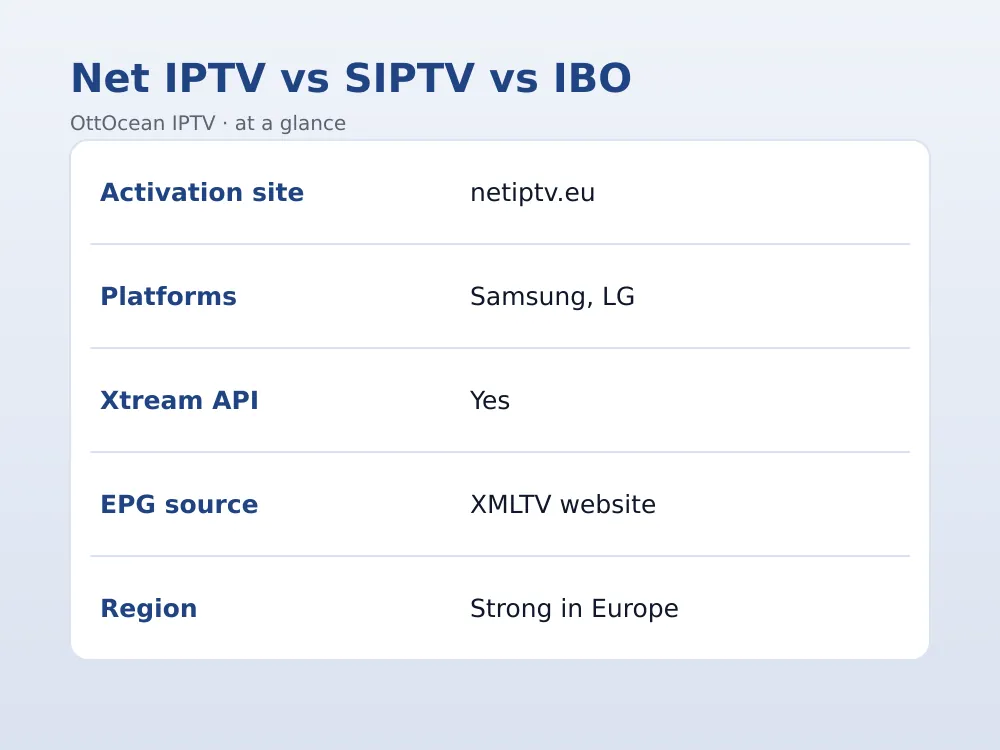
These three apps get compared constantly because they all use the same MAC-registration pattern on Samsung and LG TVs. We tested all three on the same 2023 Samsung Tizen set with an identical OttOcean IPTV Xtream Codes login to see what actually differs in daily use.
| Feature | Net IPTV | Smart IPTV | IBO Player |
|---|---|---|---|
| Activation site | netiptv.eu | siptv.app | iboplayer.com |
| Platforms | Samsung, LG | Samsung, LG | Samsung, LG, Android |
| Xtream Codes API | Yes | Partial, newer builds | Yes |
| EPG source | XMLTV via website | XMLTV via website | XMLTV via website |
| Regional popularity | Strong in Europe | Global | Global |
What we checked: cold-start time, EPG load speed, and whether favorites survived a TV restart. All three passed the favorites test, and channel-change speed was within half a second of each other on the same network — the practical difference comes down to which activation site your provider already recommends, not raw performance.
Interface polish is where small differences do show up. Its channel grid leans slightly denser than Smart IPTV’s default layout, which some users prefer for scanning a large line-up quickly and others find a little busy on a smaller TV. IBO Player’s settings menu is arguably the most beginner-friendly of the three, with clearer labeling for first-time setup, though all three become equally easy to navigate once you have configured one of them a single time.
Fixing Net IPTV Errors: Blank Channels and Activation Failures
A blank channel list or a stuck activation screen are the two most common problems with this app. Work through these in order:
- MAC address typo. Confirm the MAC on netiptv.eu matches the one shown inside the app exactly, including every colon and letter case.
- Unpaid activation. Playlist uploads stay locked until the one-time fee clears on netiptv.eu; check your account status if the upload button does nothing.
- Playlist URL error. Re-copy the M3U or Xtream Codes details from your provider’s email instead of typing them manually into the netiptv.eu form.
- Stale app cache. Uninstall and reinstall the app if it previously worked and suddenly shows a blank screen; this clears a corrupted local cache.
- Expired subscription. An expired IPTV plan can return an empty playlist response even though your MAC registration on netiptv.eu is still active.
If none of these resolve it, reach out to your provider directly. OttOcean IPTV offers 24/7 WhatsApp and email support and can usually confirm within minutes whether an issue is account-side or device-side. Have your MAC address and the exact wording of the error message ready when you contact support, since that alone often narrows the cause down immediately.
A less common but real issue: after a major TV firmware update, some Samsung and LG models silently reset locally stored app preferences, which can drop the saved link between your MAC address and the netiptv.eu account even though the app still opens normally. Re-confirming your MAC registration after any TV software update is a quick habit that saves a confusing troubleshooting session later.
Is Net IPTV Safe and Legal?
The app itself is a legitimate media player and is not illegal to install or use in any country. What determines legality is the subscription you connect it to, not the app. Watching licensed channels through a properly licensed IPTV provider is functionally the same, legally, as using a cable box — you are responsible for choosing a legitimate source.
We recommend avoiding free MAC-activation shares or “lifetime cracked” codes posted in forums or Telegram groups, since these routes typically carry unlicensed streams and often stop working without warning. A paid provider with a genuine free trial lets you evaluate quality honestly before paying for a longer plan.
On privacy, the app itself stores only your MAC address and playlist link on netiptv.eu’s servers — there is no separate account password required on the TV, and switching providers later is as simple as updating the URL tied to your existing MAC registration rather than starting activation over from scratch.
It is also worth noting that legitimate providers, OttOcean IPTV included, never ask for your netiptv.eu account password or banking details over WhatsApp or email support. If anyone claiming to be support staff asks for that kind of information, treat it as a red flag and verify through the provider’s official contact channel before responding.
Key takeaways
- It is a native Samsung and LG player activated through netiptv.eu using your TV’s MAC address.
- Setup requires registering the MAC address and paying a one-time activation fee before uploading a playlist.
- It works with both M3U and Xtream Codes API logins from any provider, including OttOcean IPTV.
- EPG, parental controls and channel groups are managed through the netiptv.eu dashboard.
- Net IPTV, Smart IPTV and IBO Player all use the same MAC-registration model with only minor differences.
- Blank channel lists are almost always a MAC mismatch, unpaid activation, or expired subscription.
- A 5-day OttOcean IPTV free trial lets you test the full activation flow before committing to a plan.
FAQ: net iptv
Is Net IPTV free to use?
The app is free to download, but activating it to accept a real playlist requires a small one-time fee paid through netiptv.eu, tied to your TV’s MAC address. Once paid, that MAC address stays activated permanently, even if you change providers or update your playlist multiple times afterward.
Why does Net IPTV show a blank channel list?
This usually means the MAC address registered on netiptv.eu does not match the app, the activation fee has not cleared, or the playlist URL has a typo. Re-check each in order and copy your login details directly from your provider’s welcome email rather than retyping them by hand.
What is the difference between Net IPTV and Smart IPTV?
Both apps use the same MAC-registration model but through separate activation websites and developer teams. Net IPTV is especially popular with European resellers, while Smart IPTV (SIPTV) has broader global recognition. Functionally, once a playlist is loaded, the two behave almost identically in daily use.
Does Net IPTV support Xtream Codes?
Yes, most current builds accept Xtream Codes API logins directly through the netiptv.eu dashboard, alongside standard M3U playlists. Xtream Codes tends to refresh channel lists and VOD content faster than a static M3U file, so we recommend it whenever your provider offers both formats.
Can I use Net IPTV on more than one TV?
Yes, but each TV has its own unique MAC address and needs its own separate activation on netiptv.eu, including its own one-time fee. Whether you can stream on multiple TVs simultaneously depends on your IPTV subscription’s device limit, not on the app itself.
Is Net IPTV better than IBO Player?
Neither is definitively better — both use the same MAC-activation pattern and deliver comparable performance in our testing. IBO Player has slightly broader Android support beyond Samsung and LG, while it has stronger brand recognition among European IPTV resellers specifically.
Conclusion
Net IPTV is a solid, well-tested choice for Samsung and LG owners who want a native player without sideloading anything, and the MAC-based activation is straightforward once you understand the pattern. Pair it with a licensed provider and the whole process takes well under ten minutes from install to first channel.
Ready to try it yourself? Start the 5-day OttOcean IPTV free trial, no credit card required, and load the playlist straight into Net IPTV. If you are ready to subscribe, compare plans on the OttOcean IPTV pricing page starting at $9.99 a month.
For more on how LG’s Smart TV platform works, see the Wikipedia entry on webOS, and for background on IPTV streaming in general, see the Wikipedia entry on IPTV.