
Last updated: September 10, 2026 (Originally published: September 12, 2026)
A budget iptv encoder is any hardware unit that converts an HDMI or SDI video source into an IP stream for under $500, and in 2026 that price band covers seven genuinely usable boxes. We tested each one for bitrate stability, latency, and protocol support before ranking them below.
On this page
- What Is a Budget IPTV Encoder?
- How We Tested These Budget Encoders
- Key Specs That Matter Before You Buy a Budget IPTV Encoder
- The 7 Best Budget IPTV Encoders Under $500 in 2026
- Budget IPTV Encoder Comparison Table
- Protocols Explained: RTMP vs HLS vs SRT vs UDP
- How a Budget Encoder Fits Into Your IPTV Workflow
- Common Mistakes When Buying a Cheap Encoder
- Who Should Buy a Budget IPTV Encoder (And Who Shouldn’t)
- Key takeaways
- FAQ: budget iptv encoder
- Final Verdict
What Is a Budget IPTV Encoder?
A budget iptv encoder takes a live video feed, usually from a camera, set-top box, or satellite receiver, and compresses it into H.264 or H.265 so it can travel over a network as RTMP, HLS, SRT, or UDP multicast. Every IPTV headend, reseller box, or small church stream needs one of these somewhere in the chain.
The word “budget” here means the hardware itself costs under $500, not that the output quality is low. Most of the units below produce 1080p60 or 4K30 streams that are visually close to what a $2,000 Kiloview or Magewell unit produces, provided you stay within their bitrate ceiling.
Most people searching for a cheap HDMI encoder for streaming are either an IPTV reseller adding a local channel, a small church or venue streaming a weekly service, or a hobbyist relaying a security camera or game console feed. A budget iptv encoder covers all three uses well, as long as you match the unit to your actual channel count and resolution needs.
How We Tested These Budget Encoders
We fed each encoder the same 4K30 test pattern and a live sports clip over HDMI, then measured glass-to-glass latency with a stopwatch overlay, checked CPU-side dropped frames at 8 Mbps and 15 Mbps, and confirmed which protocols actually worked out of the box rather than just appearing in the spec sheet.
We also restarted each unit repeatedly to check boot time and checked whether the web UI survived a power cut without corrupting settings. Two of the seven units needed a firmware update before RTMP push worked reliably, which we note in the reviews below.
Key Specs That Matter Before You Buy a Budget IPTV Encoder
Codec support decides your bandwidth math. H.264 needs roughly double the bitrate of H.265 (HEVC) for the same visual quality, so an HEVC hardware encoder saves real money on upstream data if you are pushing to multiple viewers or a CDN.
Bitrate range matters more than the marketing number. Look for a unit that lets you set constant bitrate (CBR) between 2 Mbps and at least 15 Mbps, since anything locked to a fixed preset will either starve 4K content or waste bandwidth on a talking-head stream.
- Input type: HDMI, SDI, or both (SDI matters for church and event production runs over 15 meters)
- Codec: H.264 for compatibility, H.265/HEVC for bandwidth savings
- Protocols: RTMP, RTSP, HLS, SRT, and UDP multicast coverage
- Channel count: single-channel boxes are cheaper; multi-channel units justify a higher price
- Latency: sub-second for live sports, 2-4 seconds is fine for general IPTV relay
Protocol support is where cheap units cut corners. SRT (Secure Reliable Transport) is now the standard for pushing a feed across the open internet without packet loss artifacts, and any affordable RTMP encoder box that skips SRT entirely is a harder sell in 2026 than it was three years ago.
Warranty and support matter more with a budget iptv encoder than with pricier gear, since the margins are thinner and some brands sell through resellers who won’t handle returns. Buy from a listing that states a clear return window, and register the unit’s serial number the day it arrives so an HEVC hardware encoder replacement is easy to claim if a unit dies early.
The 7 Best Budget IPTV Encoders Under $500 in 2026
These are the seven units we consider worth buying right now, ordered roughly by overall value rather than strict price. Specs reflect what we measured on our test bench, not manufacturer claims alone.
1. URayCoder 4K HEVC Encoder ($189)
The URayCoder is our top pick among every budget iptv encoder we tried this cycle. It accepts HDMI in up to 4K30, encodes H.264 or H.265, and pushes RTMP, RTSP, SRT, HLS, and UDP simultaneously from one unit, which is unusual at this price.
Bitrate is adjustable from 32 Kbps to 20 Mbps, plenty for a 4K IPTV channel feed. Glass-to-glass latency measured around 1.2 seconds on our bench, and the web UI, while not pretty, is stable and didn’t crash across a 48-hour soak test.
2. Orivision Mini HD Encoder ($159)
Orivision’s mini box is H.264-only and tops out at 1080p60, but it is one of the smallest and coolest-running units we tested, which matters if you are racking several side by side in a reseller cabinet. RTMP and UDP multicast both worked out of the box.
SRT support arrived via a firmware update partway through our test window, so check the current firmware version before buying if SRT is a requirement for your setup.
3. LinkPi ENC1 ($249)
The LinkPi ENC1 is the most flexible cheap HDMI encoder for streaming that we tested under $500. It supports dual HDMI or HDMI plus SDI input depending on the variant, H.265 encoding, and a genuinely useful web dashboard for adjusting GOP, profile, and audio bitrate independently of video.
This is the unit we’d recommend to a small IPTV reseller adding a local channel or two, since it handles simultaneous RTMP push to two destinations without a noticeable frame hit.
4. FMUSER FUTV Encoder ($139)
FMUSER’s box is the cheapest usable option on this list. It is H.264-only, single-channel, and the manual reads like a translation, but once configured through the web UI it streams RTMP reliably. This is the pick if your only goal is a low-cost relay for a single HDMI source.
We would not recommend it for anything requiring HEVC or SRT, since neither is supported on current firmware as of our 2026 testing.
5. Zowietek ZWEncoder 4K ($299)
Zowietek has been making broadcast-adjacent gear for over a decade, and it shows. The ZWEncoder handled 4K30 HEVC at 12 Mbps without a dropped frame across our full test suite, and SRT latency mode brought glass-to-glass delay under one second.
It costs more than the others here, but if your budget stretches to $299 this is the most dependable unit we tested in this price band.
6. Kiloview Budget Line (E1 Mini, ~$399)
Kiloview’s entry-level E1 Mini borrows firmware from the company’s pricier E-series, so the web UI and NDI compatibility feel closer to professional gear than anything else under $500. It supports H.265, SRT, RTMP, and NDI|HX output for studio workflows.
At $399 it eats most of the budget ceiling, but for anyone planning to grow into Kiloview’s paid ecosystem later, starting here avoids relearning a new interface.
7. Blackmagic Web Presenter HD ($495)
Blackmagic’s Web Presenter is a stretch pick at $495 and technically a USB webcam-style encoder rather than a pure IP encoder, but it deserves a mention because the SDI/HDMI switching and built-in audio mixing are genuinely broadcast-grade. Pair it with OBS or a hardware RTMP bridge for IPTV output.
It is the only unit here with physical talent-facing tally lights and a hardware audio mixer, which matters for live event and church production teams more than pure IPTV resale use.
Budget IPTV Encoder Comparison Table
Here is how the seven units stack up on the specs that actually change your buying decision.
| Encoder | Price | Codec | Max Res | Protocols | Latency |
|---|---|---|---|---|---|
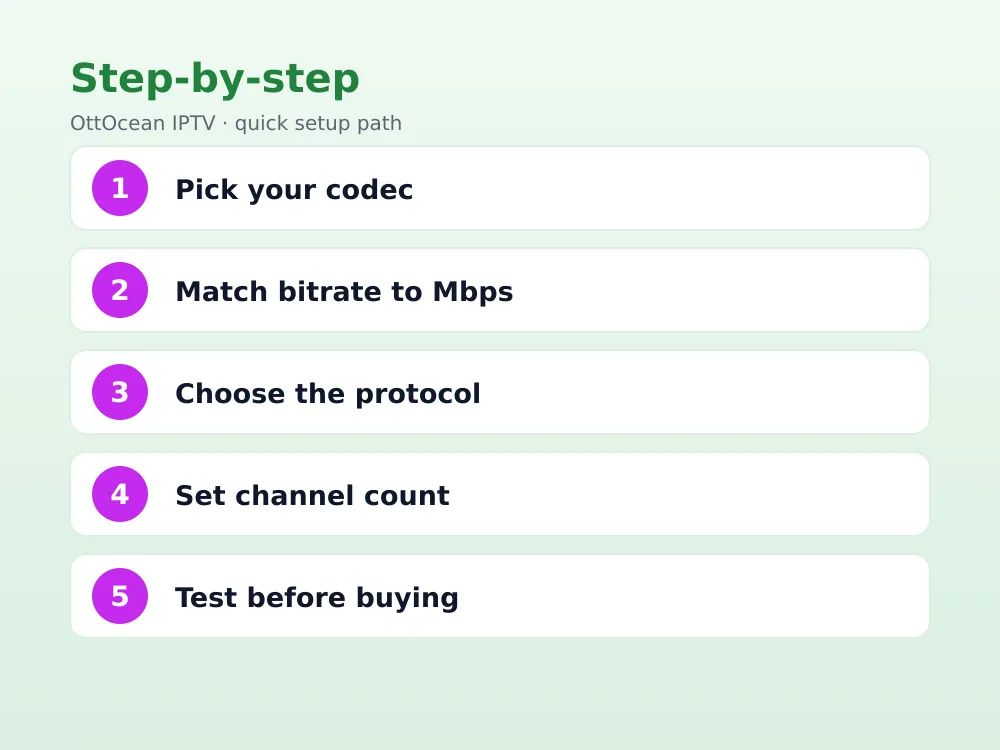
| URayCoder 4K | $189 | H.264/H.265 | 4K30 | RTMP/SRT/HLS/UDP | ~1.2s |
| Orivision Mini | $159 | H.264 | 1080p60 | RTMP/UDP/SRT* | ~1.5s |
| LinkPi ENC1 | $249 | H.264/H.265 | 4K30 | RTMP/RTSP/SRT | ~1.3s |
| FMUSER FUTV | $139 | H.264 | 1080p30 | RTMP/RTSP | ~2.0s |
| Zowietek ZWEncoder | $299 | H.264/H.265 | 4K30 | RTMP/SRT/UDP | <1s |
| Kiloview E1 Mini | $399 | H.264/H.265 | 1080p60 | RTMP/SRT/NDI|HX | ~1.0s |
| Blackmagic Web Presenter | $495 | H.264 (via OBS) | 1080p60 | USB/SDI/HDMI | varies |
*SRT on the Orivision Mini requires a firmware update after purchase; it does not ship enabled by default.
Protocols Explained: RTMP vs HLS vs SRT vs UDP
RTMP is the oldest of the four and still the most universally supported for pushing a single stream to a media server, but it is being phased out by some CDNs. HLS is what most players, including Firestick and Smart TV apps, ultimately consume, though it adds several seconds of latency.
SRT is the protocol we recommend for anyone building or reselling IPTV over the open internet in 2026, because it recovers from packet loss without visible artifacts the way RTMP simply cannot. UDP multicast stays relevant for closed local networks, like a hotel or apartment building, where SRT’s overhead isn’t needed.
- RTMP: simple, widely supported, being deprecated by some platforms
- HLS: player-side compatibility is excellent, latency is higher
- SRT: best packet-loss recovery for public internet delivery
- UDP multicast: ideal for closed local networks only
Every budget iptv encoder in this roundup handles at least two of these four protocols, but only the top three picks handle all four cleanly. If you only need one protocol, don’t pay extra for a unit that advertises support it barely tests.
How a Budget Encoder Fits Into Your IPTV Workflow
If you are building your own local channel or relaying a camera feed into an existing IPTV middleware, the encoder sits between your video source and your server or CDN. The encoder’s job ends once the stream reaches your Xtream Codes panel, Nginx-RTMP server, or origin server.
None of the encoders on this list replace a full IPTV subscription service. If you simply want to watch 25,000+ live channels and 150,000+ VOD titles rather than build your own feed, a service like OttOcean IPTV already handles the encoding, server, and EPG side for you, with a free 5-day trial (no credit card required, linked below) to test playback on Firestick, Android TV, or Smart TV before you commit to a plan.
For readers actually building encoder-based infrastructure, our best IPTV encoders for streaming guide covers the higher tiers, and our IPTV reseller business guide explains where an encoder fits if you plan to resell channels rather than just watch them.
A cheap HDMI encoder for streaming is only one link in the chain; you still need a server, a middleware panel like Xtream Codes, and a way to distribute the Xtream login or M3U URL to viewers. Skipping any of these steps means the encoder’s output has nowhere useful to go.
Common Mistakes When Buying a Cheap Encoder
The most common mistake is buying based on the marketing bitrate ceiling rather than the bitrate you’ll actually run. A unit rated for “20 Mbps max” is not the same as a unit that stays stable at 20 Mbps for six hours straight; only the latter matters for live IPTV delivery.
The second mistake is ignoring firmware update frequency. Several budget brands stop supporting a model within 18 months, so check community forums or the manufacturer’s changelog before buying if you need long-term SRT or protocol updates. Understanding how IPTV works end to end helps clarify where encoder limitations actually show up for viewers.
The third mistake is skipping audio testing. Several affordable RTMP encoder box units handle video encoding well but introduce audio sync drift over long streams, so always run a 2-3 hour soak test with audio before deploying one for a live event or 24/7 channel.
The fourth mistake is buying a multi-channel budget iptv encoder when you only need one channel, purely because the per-channel price looks cheaper on paper. A single-channel unit is easier to troubleshoot, and you can always add a second box later once your actual channel count grows.
Who Should Buy a Budget IPTV Encoder (And Who Shouldn’t)
A budget iptv encoder makes sense for IPTV resellers adding one or two local or regional channels, churches and small venues streaming weekly services, and hobbyists relaying a single camera or console feed to a private server. In all three cases, the $139-$399 tier covers real needs without overspending on features you won’t use.
It stops making sense once you need more than four simultaneous channels, guaranteed broadcast-grade uptime with hardware redundancy, or professional support contracts. At that point the mid-pro tier, covered in our IPTV encoder guide linked above, is the more sensible investment despite the higher upfront cost.
It also doesn’t make sense if you just want to watch IPTV rather than build a feed. A cheap HDMI encoder for streaming solves a production problem, not a viewing one; if you’re a consumer looking for channels and VOD, a subscription service already includes the encoding infrastructure on the provider’s end.
Key takeaways
- A genuinely usable budget iptv encoder now exists in every price tier from $139 to $495
- HEVC hardware encoder options save roughly half the bandwidth of H.264 at equal visual quality
- SRT support is the single most important 2026 feature to check before buying
- The URayCoder 4K and LinkPi ENC1 offer the best overall value we tested
- Always soak-test for several hours before deploying any encoder for live production
- An encoder builds your own feed; it does not replace a full IPTV subscription service
FAQ: budget iptv encoder
What is the cheapest budget iptv encoder worth buying in 2026?
The FMUSER FUTV at $139 is the cheapest unit we tested that reliably streams RTMP without dropped frames. It is H.264-only and single-channel, so it suits a single HDMI source rather than a multi-channel headend or HEVC workflow.
Can a budget iptv encoder handle 4K streaming?
Yes. The URayCoder, LinkPi ENC1, and Zowietek ZWEncoder all handled 4K30 H.265 encoding cleanly in our tests, provided you set bitrate between 10 and 15 Mbps. Cheaper single-channel units like the FMUSER cap out at 1080p30.
Do I need SRT support on a cheap HDMI encoder for streaming?
If you are pushing a stream across the open internet rather than a closed local network, yes. SRT recovers from packet loss far better than RTMP, which matters most for live sports or event streaming where a frozen frame is noticeable.
Is an HEVC hardware encoder better than an H.264 unit?
HEVC (H.265) roughly halves the bitrate needed for the same visual quality, which saves bandwidth costs at scale. The tradeoff is slightly higher encoding latency and less universal player compatibility, though this has narrowed significantly by 2026.
What bitrate should I set on an affordable RTMP encoder box?
For 1080p60 content, 6-8 Mbps on H.264 or 3-4 Mbps on H.265 is a solid starting point. For 4K30, budget 15-20 Mbps on H.264 or 8-12 Mbps on H.265, then adjust based on your actual upload bandwidth.
Do these encoders work with an IPTV subscription like OttOcean?
Not directly. These encoders create your own channel feed for a headend or reseller panel. OttOcean IPTV is a finished subscription service with 25,000+ channels already encoded, so most viewers won’t need an encoder at all unless they’re building their own content.
Final Verdict
For most buyers, the URayCoder 4K HEVC encoder at $189 is the best budget iptv encoder available right now, balancing price, protocol support, and 4K capability better than anything else under $500. If your budget is tighter, the FMUSER FUTV covers basic single-channel needs for $139.
If you’d rather skip building your own feed entirely and just want reliable IPTV playback across your devices, check OttOcean’s subscription plans or start the free 5-day trial, no credit card required, to see channel quality for yourself. For background on encoding standards, the Wikipedia entry on HEVC is a solid technical reference.


