
Last updated: October 4, 2026
IPTV on non smart tv setups are more common than you’d think, since most households still have at least one older television without a built-in app store. We tested five ways to add live channels to a dumb TV in 2026, ranked from cheapest to most capable.
On this page
- What You Need to Add IPTV on Non Smart TV
- Fire TV Stick: The Cheapest Way to Get IPTV on Non Smart TV
- Onn Google TV Box: Walmart’s Budget Alternative
- Android TV Box: More Power, More Storage
- MAG Box: The Dedicated IPTV Set-Top Option
- Laptop, Mini PC, and RCA Converters for Older Sets
- Wi-Fi, Bandwidth, and Picture Quality Tips
- Onn Box vs Fire Stick for IPTV on Non Smart TV
- Comparing the Five Ways to Get IPTV on Non Smart TV
- Key Takeaways
- FAQ: IPTV on Non Smart TV
- Getting IPTV Running on Your Non Smart TV Today
What You Need to Add IPTV on Non Smart TV
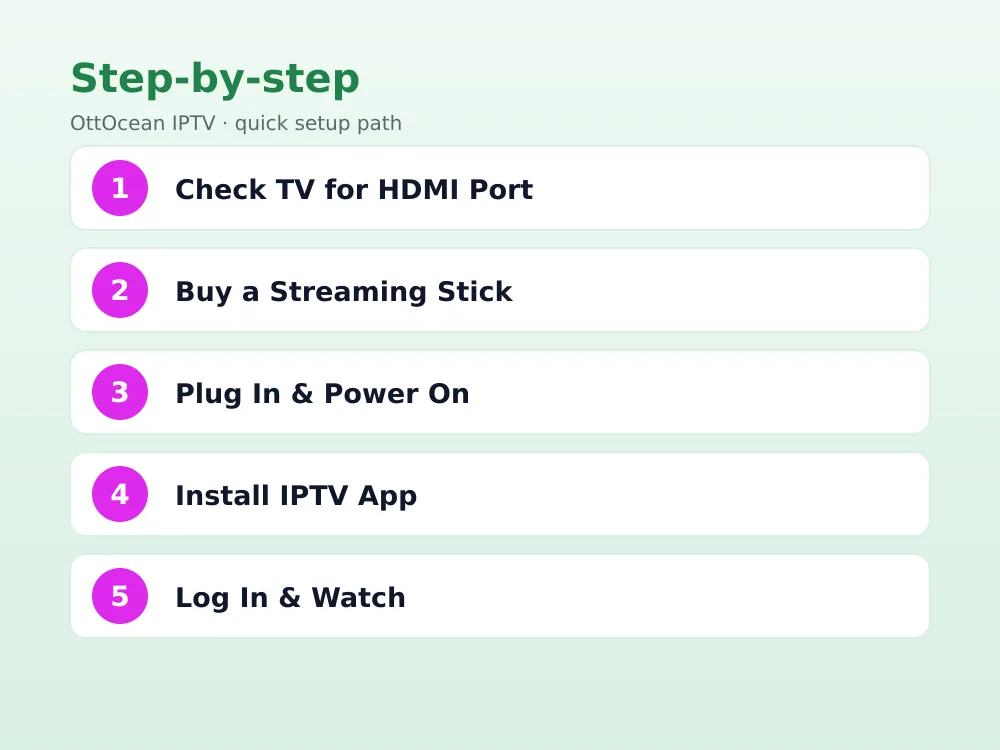
Before buying anything, check the back of your television for ports. Almost every TV made since roughly 2010 has at least one HDMI input, even if it has no internet connection or app store of its own. That single port is all you need, because the streaming device does the smart-TV job instead of the television itself.
Older sets from the composite-cable era only have yellow/red/white RCA jacks or a coaxial antenna input. Those still work for IPTV on non smart TV, just with an extra $15-20 RCA-to-HDMI converter box in the chain. You will also want your IPTV login ready: an Xtream Codes API username/password/server combination or an M3U playlist URL, plus a Wi-Fi network rated for at least 10-15 Mbps for HD content.
It helps to know your TV’s exact HDMI version too, since older HDMI 1.4 ports cap out at 1080p60 and will not pass a full 4K signal even from a 4K-capable streaming stick. That is not a dealbreaker for IPTV old tv setups, since most providers stream a mix of 1080p and 4K channels anyway, but it explains why a “4K” stick sometimes still shows 1080p on an older television’s on-screen display.
- A streaming device: Fire TV Stick, Onn Google TV box, Android box, or MAG box
- A free HDMI port, or an RCA-to-HDMI converter for pre-2010 televisions
- Wi-Fi or Ethernet rated for 10-15 Mbps (HD) or 25 Mbps (4K)
- Your IPTV provider’s Xtream Codes login or M3U playlist URL
Fire TV Stick: The Cheapest Way to Get IPTV on Non Smart TV
The Fire TV Stick HD ($29.99) or Fire TV Stick 4K ($34.99) from Amazon is the most popular fix for IPTV old tv setups because it plugs directly into HDMI, uses the TV’s existing remote-free power via USB or a wall adapter, and gets you into an app store in under five minutes. Download IPTV Smarters Pro or TiviMate from the Amazon Appstore, or sideload them via the Downloader app if they are not listed in your region.
Once installed, open the app and enter your Xtream Codes login or paste your M3U URL. IPTV Smarters Pro is the friendlier option for first-time users since it walks you through both login types with clear labeled fields. Fire Stick devices support up to 4K HDR on the higher-end model, so even an old 1080p non smart TV benefits from the sharper upscaling most streaming sticks apply automatically.
Setting Up a Firestick Non Smart TV Combo
Plug the stick into HDMI, connect the included USB power cable to either the TV’s USB port or a wall outlet, and switch your TV’s input source to match the HDMI port used. Sign in with (or create) an Amazon account, connect to Wi-Fi, then head to the Appstore search bar and type “IPTV Smarters” or “TiviMate” to install your player of choice.
Onn Google TV Box: Walmart’s Budget Alternative
Walmart’s Onn 4K Streaming Box, often under $25 and sometimes on sale for less, runs Google TV rather than Fire OS, which means direct access to the Google Play Store instead of Amazon’s more limited catalog. That makes IPTV Smarters Pro, TiviMate, XCIPTV and GSE IPTV all a normal Play Store download with no sideloading required.
Performance on the standard Onn box is adequate for HD but can stutter on demanding 4K UI animations; the Onn 4K Pro model adds more RAM and a faster processor for a smoother experience. Either version handles live channel playback fine once the app itself is loaded, since video decoding matters more than general UI speed for IPTV on non smart TV use.
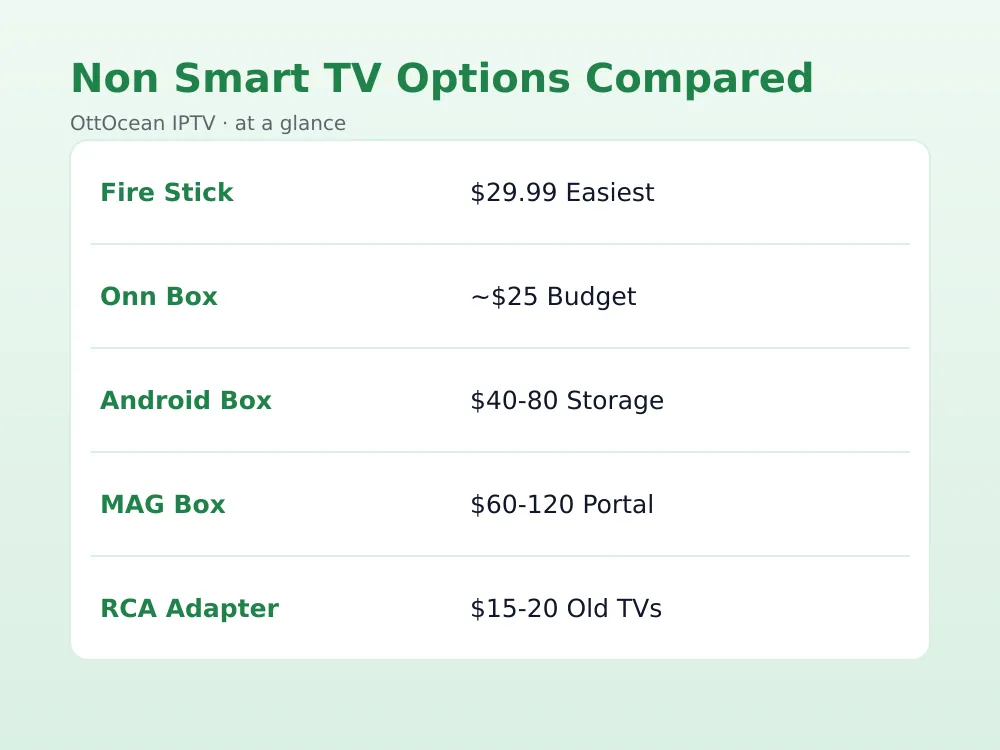
| Device | Price | App Store | Best For |
|---|---|---|---|
| Fire TV Stick 4K | $34.99 | Amazon Appstore | Easiest setup |
| Onn Google TV Box | ~$25 | Google Play | Budget + Play Store apps |
| Android TV Box | $40-80 | Google Play/sideload | Storage and ports |
| MAG Box | $60-120 | Built-in portal | Dedicated IPTV only |
| RCA-to-HDMI + Stick | $45-55 total | Depends on stick | Pre-2010 TVs |
Android TV Box: More Power, More Storage
A generic Android box, often running Android 11 or 13 with names like X96, H96, or T95, typically costs $40-80 and includes more storage and RAM than a Fire Stick or Onn box, along with a full-size USB port and sometimes an Ethernet jack built in. That wired connection is a real advantage for IPTV on non smart TV setups in rooms where Wi-Fi signal is weak.
The android box iptv setup process mirrors any other Android device: open the Play Store, search for your preferred app, and sign in with your provider’s credentials. Because these boxes run stock-ish Android rather than a locked launcher like Fire OS, you can also sideload APKs directly from a USB drive if an app is missing from the store in your region.
MAG Box: The Dedicated IPTV Set-Top Option
MAG boxes (MAG 250, 322, 424 and similar Infomir models) are purpose-built IPTV set-top boxes rather than general streaming devices. Instead of downloading an app, you enter your provider’s portal URL directly into the box’s settings menu, and it loads channels through a built-in Stalker or Ministra portal interface. This is the closest thing to a traditional cable box experience for a non smart TV.
The downside is cost and flexibility: MAG boxes run $60-120, lack a general app store, and only work if your provider explicitly supports MAG/Stalker portal delivery rather than just Xtream Codes or M3U. Most Xtream-based services, including OttOcean IPTV, can be configured on a MAG box, but check with support first since the portal URL format differs from a standard Xtream login.
MAG boxes also lack the broader app ecosystem of an android box iptv setup, so you cannot install Netflix, YouTube, or games alongside your channels the way you can on Fire Stick, Onn, or a general Android box. If IPTV on non smart TV is the only thing you need the device for, that limitation does not matter; if you want one box for everything, a general streaming device is the better buy.
Laptop, Mini PC, and RCA Converters for Older Sets
Any laptop with an HDMI output can act as a temporary IPTV on non smart TV solution: install VLC or a web-based Xtream player, connect an HDMI cable, and switch the TV input. It is not a permanent setup since you are tying up a laptop, but it works in a pinch or for testing a subscription before buying dedicated hardware. A small mini PC left permanently connected solves the same problem without the inconvenience.
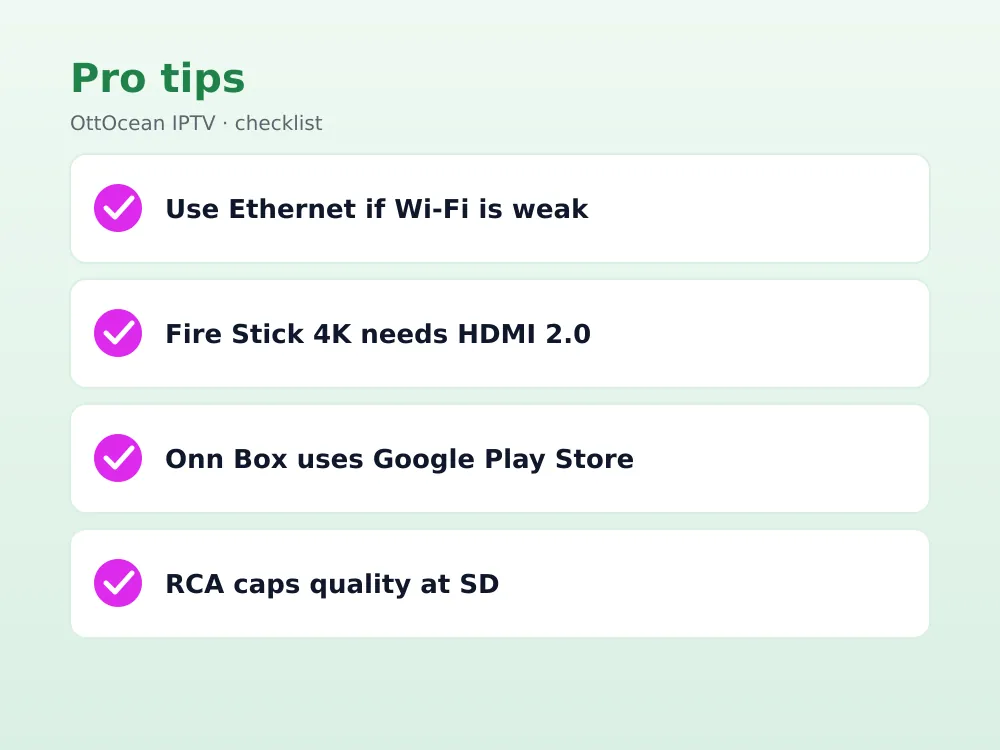
For televisions old enough to only have RCA composite or coaxial inputs, an RCA-to-HDMI converter box (roughly $15-20) sits between a Fire Stick or Android box and the TV, converting the digital HDMI signal down to composite. Picture quality drops to standard definition regardless of the source resolution, since composite cable physically cannot carry HD signal, but it is often the only option for TVs made before the mid-2000s.
- Laptop or mini PC: free if you already own one, not a permanent fix
- RCA-to-HDMI converter: $15-20, required for TVs with no HDMI port
- Picture quality through RCA conversion is capped at standard definition
- Any streaming device still needs its own IPTV app installed as usual
Wi-Fi, Bandwidth, and Picture Quality Tips
Streaming devices for IPTV old tv setups pull their own Wi-Fi signal independently of the television, so a smart-looking picture depends entirely on the stick or box’s connection, not the TV’s age. Keep your router within reasonable range of wherever the device sits, or use a Wi-Fi extender if the TV is in a room far from the router.
For 1080p HD channels, aim for at least 10-15 Mbps sustained; 4K streams need closer to 25 Mbps. Whichever device you choose, an Ethernet adapter (built into some Android boxes, or added via USB-to-Ethernet on a Fire Stick 4K) is more reliable than Wi-Fi for avoiding buffering, especially with an older router that only supports 2.4GHz.
Onn Box vs Fire Stick for IPTV on Non Smart TV
These two devices get compared constantly because they sit in the same price bracket and both turn any dumb TV into a smart one. The Fire TV Stick 4K has a slight edge in raw app selection, since Amazon’s Appstore has been the default IPTV destination for longer and most tutorials assume a Firestick non smart tv setup. Remote quality is also a notch better, with Alexa voice search built in on every model.
The Onn Google TV box counters with Play Store access, which matters if you already use Android apps elsewhere and want a consistent library, plus a marginally lower price during Walmart sales. Neither device meaningfully outperforms the other for IPTV playback itself, since both handle Xtream Codes and M3U logins identically inside IPTV Smarters Pro or TiviMate. Pick based on which app ecosystem and remote you already prefer.
Storage is the other differentiator worth noting: the base Fire TV Stick 4K ships with 8GB, while the Onn box offers slightly more headroom for installing several IPTV apps side by side. If you plan to run more than two or three streaming apps on the same device, that extra space avoids the “storage full” prompts that force you to uninstall something before adding IPTV Smarters Pro or TiviMate.
Comparing the Five Ways to Get IPTV on Non Smart TV
For most people, a Fire TV Stick or Onn Google TV box is the right call: both are under $35, take five minutes to set up, and support every major IPTV app. Choose Fire TV Stick if you already use Amazon services or want the largest app catalog; choose Onn if you prefer Google Play Store access or want to save a few dollars.
An Android box makes sense if you want extra storage, a wired Ethernet port, or plan to sideload apps outside the Play Store. A MAG box only makes sense if your provider specifically supports Stalker portal delivery and you want a dedicated appliance rather than a general streaming device. RCA converters and laptops are stopgaps for genuinely old hardware or quick testing, not long-term setups.
Key Takeaways
- A Fire TV Stick or Onn Google TV box is the cheapest, fastest way to add IPTV on non smart TV
- Any TV with a free HDMI port from roughly 2010 onward works with a streaming stick or box
- Pre-2010 TVs need a $15-20 RCA-to-HDMI converter, which caps picture quality at standard definition
- Android boxes add storage, Ethernet ports, and sideloading flexibility over Fire Stick or Onn
- MAG boxes are dedicated IPTV appliances but only work with Stalker/Ministra-compatible providers
- 10-15 Mbps covers HD; budget 25 Mbps for smooth 4K on any device
- Wired Ethernet beats Wi-Fi for buffering-free playback on every device type here
FAQ: IPTV on Non Smart TV
What is the cheapest way to watch IPTV on non smart TV?
A Fire TV Stick HD at $29.99 or a Walmart Onn Google TV box around $25 are the cheapest reliable options in 2026. Both plug into any spare HDMI port, install IPTV apps like IPTV Smarters Pro or TiviMate in minutes, and need no technical skill beyond entering your provider’s login.
Can I add IPTV old tv setups without any HDMI port?
Yes, using an RCA-to-HDMI converter box priced around $15-20. Connect your Fire Stick or Android box to the converter, then run RCA composite cables into the TV’s yellow/red/white jacks. Picture quality drops to standard definition since composite cable cannot carry HD or 4K signal regardless of source quality.
Is an android box iptv setup better than a Fire Stick?
It depends on your priorities. Android boxes typically offer more storage, RAM, and sometimes a built-in Ethernet port, which helps with buffering. Fire Sticks are cheaper, smaller, and have a more polished remote experience. Both run the same IPTV apps equally well once installed and logged in.
Do MAG boxes work with any IPTV provider?
Only providers that support Stalker or Ministra portal delivery, which is a different login format from Xtream Codes or M3U. Check with your provider’s support team before buying a MAG box specifically for this purpose, since most modern services are built around Xtream Codes rather than the older MAG portal standard.
How much internet speed do I need for IPTV on non smart TV?
Plan for 10-15 Mbps sustained for smooth HD channels and roughly 25 Mbps for 4K content. These numbers apply to whichever streaming device you choose, since the device (not the TV) handles the internet connection. Wired Ethernet is more stable than Wi-Fi if buffering becomes an issue.
Will a laptop work as a permanent IPTV on non smart TV solution?
Technically yes, using VLC or a browser-based Xtream player connected via HDMI, but it is impractical long-term since it ties up a laptop and lacks a TV-friendly remote interface. It works well for a quick test of your subscription before buying a dedicated $25-35 streaming stick or box.
Is a firestick non smart tv setup better than an Onn box?
Neither is objectively better; a Firestick non smart tv setup gives you Amazon’s larger app catalog and Alexa voice remote, while Onn gives you Google Play Store access and slightly more storage. Both run IPTV Smarters Pro, TiviMate, or GSE IPTV identically well once your provider login is entered.
Does an android box iptv setup need a Google account?
Most Android boxes ask for a Google account to access the Play Store, though you can skip this and sideload IPTV apps as APK files from a USB drive instead. Sideloading is common on generic Android boxes since it avoids region restrictions some apps have on the Play Store.
Getting IPTV Running on Your Non Smart TV Today
Adding IPTV on non smart TV takes one small purchase and about ten minutes of setup. For most households, a Fire TV Stick or Onn Google TV box under $35 is the fastest path, with an Android box or MAG box reserved for specific needs like Ethernet ports or Stalker portal support. Even genuinely old televisions with only RCA jacks can join in with a cheap converter.
Whichever device you pick, you will need a working IPTV login to test it with. OttOcean IPTV offers a 5-day free trial with no credit card required, so you can confirm channels, picture quality, and stability on your specific setup before subscribing. Full pricing across 1, 3, 6, 12-month and lifetime plans is on the IPTV subscription plans page. For device-specific installation walkthroughs, see our Fire Stick setup guide and Android TV setup guide. For background on how streaming devices handle live TV signals, see Google’s Android TV developer documentation and the Wikipedia overview of smart TV technology for context on what a streaming stick actually replaces.
None of this requires replacing the television itself. A ten-year-old 1080p set with one working HDMI port, or even a much older TV with only RCA jacks, can run the exact same IPTV on non smart TV setup as a brand-new smart television once a $25-35 streaming device is plugged in and logged into your provider.


