Last updated: October 26, 2026
Iptv smarters vs ibo player is the comparison most Smart TV owners run into the moment they try to load an Xtream Codes login on a Samsung or LG television. Both apps are free, both accept the same login formats, but they activate differently and support different remotes. We tested both on a 2024 Samsung Tizen TV, an LG webOS set and a Fire TV Stick using one active OttOcean IPTV account.
On this page
- How We Compared IPTV Smarters Pro and IBO Player
- What Is IPTV Smarters Pro?
- What Is IBO Player?
- Iptv Smarters Vs Ibo Player: Activation and Login Method
- Smart TV Support: Samsung and LG Compared
- Xtream Codes Vs Mac-Based Activation Explained
- EPG, VOD and Update Frequency
- Iptv Smarters Vs Ibo Player: Which for Fire TV Vs Smart TV
- Key takeaways
- FAQ: Iptv Smarters Vs Ibo Player
- Conclusion: Our Recommendation
How We Compared IPTV Smarters Pro and IBO Player
We ran this iptv smarters vs ibo player comparison on three screens tied to one active OttOcean IPTV account: a 2024 Samsung Tizen TV, an LG webOS set, and a Fire TV Stick 4K Max. The same Xtream Codes login was entered into both apps so channel counts, EPG data and VOD libraries stayed identical across the test.
We timed how long each app took to complete first setup, counted the steps needed before live TV played, checked EPG accuracy, and noted whether either app crashed over a week of daily use on each device. Neither app crashed, which matches what most long-term IPTV forum users report about both players.
What Is IPTV Smarters Pro?
IPTV Smarters Pro is a free IPTV player available on the Google Play Store, Apple App Store, Amazon Appstore, and as a direct APK download for Android TV and Fire TV boxes without app-store access. It logs in with a standard xtream codes login — username, password and server URL — or with a plain M3U playlist link, both formats OttOcean IPTV provides at signup.
The app covers Android phones and tablets, iPhone and iPad, Fire TV, Android TV, Google TV, Windows, Mac and most Samsung and LG Smart TVs through their respective app stores. That breadth is the main reason it remains one of the most recommended players for a first IPTV setup in 2026, and why it regularly appears in roundups of the best iptv app for smart tv users.
Anyone who already owns an OttOcean IPTV subscription and just wants the fastest possible xtream codes login experience across several device types will find IPTV Smarters Pro is usually the first app support recommends, precisely because the same credentials work everywhere without a separate activation step.
What Is IBO Player?
IBO Player is a Smart TV and Android TV-focused IPTV app that activates in one of two ways: a MAC address that the provider registers to your specific device, or an activation code purchased separately and entered inside the app. This process is commonly called mac address activation, and it happens once per device before any playlist login is accepted.
Once mac address activation is complete, IBO Player accepts an Xtream Codes or M3U playlist much like IPTV Smarters Pro does. IBO Player is popular on Samsung, LG and Android TV boxes because its interface renders cleanly at 4K with a simple grid layout, but the activation model means the login is often tied to the device rather than portable between screens.
Some Smart TV owners specifically search for the best iptv app for smart tv because their television’s app store already lists IBO Player as a featured download, which is part of why it has a loyal following on Samsung and LG hardware despite the extra activation step.
Both apps also support subtitle rendering, multiple audio track selection for channels that broadcast in more than one language, and adjustable buffer settings for slower home internet connections. These smaller quality-of-life details rarely decide the iptv smarters vs ibo player question on their own, but they are worth checking under each app’s playback settings menu after your first successful login.
Iptv Smarters Vs Ibo Player: Activation and Login Method
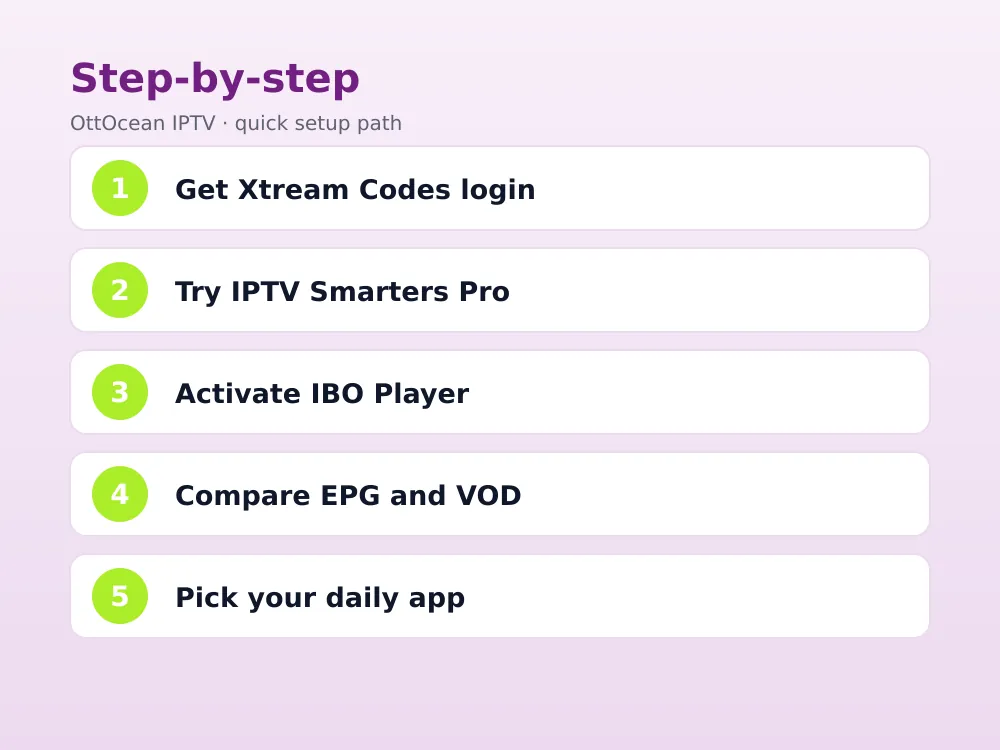
This is the core difference in the iptv smarters vs ibo player decision. IPTV Smarters Pro logs in with a reusable Xtream Codes username, password and server URL — the same three fields OttOcean IPTV emails you, usable on as many supported devices as your plan allows. IBO Player instead binds to a MAC address or a purchased activation code tied to one screen.
For OttOcean IPTV customers, this means IPTV Smarters Pro is generally the simpler path: enter the same xtream codes login on a phone, a Fire TV Stick and a laptop without contacting support each time. IBO Player can still use Xtream Codes credentials once mac address activation is finished, but that extra step is friction IPTV Smarters Pro skips entirely.
In the iptv smarters vs ibo player debate, this single difference explains most support tickets: users who expect a plug-and-play xtream codes login on IBO Player are often surprised to hit an activation screen first, while IPTV Smarters Pro users go straight from install to live channels.
- IPTV Smarters Pro: free Xtream Codes login, portable across devices instantly
- IBO Player: MAC address or paid activation code required before first login
- Both then accept the same OttOcean IPTV Xtream Codes or M3U credentials
Smart TV Support: Samsung and LG Compared
IBO Player has a strong reputation on Samsung Tizen and LG webOS Smart TVs specifically, where its lighter interface renders smoothly even on mid-range TV hardware from 2022 onward. IPTV Smarters Pro also runs on both platforms through the Samsung and LG app stores, but some older Tizen and webOS versions only support an unofficial sideloaded build.
If your Samsung or LG Smart TV is from the last two to three years, both apps install from the official store without sideloading. On older Smart TVs, check our Samsung Smart TV setup guide first, since sideloading steps differ by model year.
Before installing either app, open your TV’s own app store and search by name to confirm it is actually listed for your model. If it is missing, check the manufacturer’s release year against the app developer’s minimum supported Tizen or webOS version, since very old firmware sometimes cannot run either player at all, IPTV app or otherwise.
A quick way to sidestep the guesswork is to check both stores at once: search “IPTV Smarters” and then “IBO Player” from the TV’s home screen search bar. Whichever one actually appears as an installable result on your exact model has already made the decision for you, without needing to consult forum threads about firmware versions.
When people ask which is the best iptv app for smart tv specifically, the honest answer depends on TV age: newer Tizen and webOS models handle either app fine, while older sets sometimes only have a store listing for one of the two, which quietly decides the choice for you.
Xtream Codes Vs Mac-Based Activation Explained
Xtream Codes API is an authentication standard built around a username, password and server URL, documented informally across the IPTV community and supported by nearly every modern player, including both apps in this comparison. A MAC-based login instead ties the subscription to a hardware identifier, a method more common on preloaded IPTV boxes than on apps you install yourself.
OttOcean IPTV issues standard Xtream Codes credentials to every customer, which is why an xtream codes login works instantly on IPTV Smarters Pro without an extra step, while IBO Player needs mac address activation completed first, even though the day-to-day channel login afterward uses the same Xtream Codes details.
If you have used mac address activation on other Smart TV apps before, IBO Player’s process will feel familiar: locate the device’s MAC address in its network settings, submit it to the provider or enter a supplied code, then wait for confirmation before your Xtream Codes login is accepted.
EPG, VOD and Update Frequency
Both apps display a full electronic program guide when OttOcean IPTV’s XMLTV data is available, and both browse the same movies and series catalog through the VOD section. IPTV Smarters Pro’s VOD browser groups titles by genre and year more consistently; IBO Player’s catalog view is simpler but occasionally slower to load large libraries.
With OttOcean IPTV’s library running past 25,000 live channels and 150,000 movies and series, the way each app organizes that volume matters. IPTV Smarters Pro adds a search bar and poster-grid layout that scales well past a few thousand titles; IBO Player’s flatter list view works fine for browsing by category but is slower for finding one specific title by name.
Update frequency favors IPTV Smarters Pro slightly, since it has a larger user base and a more active official support presence across platforms. IBO Player updates less predictably, and some Smart TV store listings lag behind the latest Android TV build by a version or two.
Neither update schedule affects your xtream codes login itself, since that authentication happens on OttOcean IPTV’s servers, not inside the app. A slower app update mostly shows up as a dated interface or a missing minor feature, not a broken login.
Catch-up playback is available on both apps once OttOcean IPTV marks a channel as archive-enabled, which covers most sports and entertainment networks for a rolling 24 to 72 hour window. Neither player requires a separate purchase for this feature, unlike some rival IPTV players that gate catch-up behind a paid tier.
Iptv Smarters Vs Ibo Player: Which for Fire TV Vs Smart TV
For a Fire TV Stick, IPTV Smarters Pro is the clearer choice: it installs from the Amazon Appstore, logs in with Xtream Codes instantly, and our IPTV Smarters Firestick installation guide covers the exact steps. For a Samsung or LG Smart TV where you want the leanest possible interface and do not mind a one-time activation step, IBO Player is a reasonable alternative worth testing.
Android TV boxes such as the Nvidia Shield or an Onn Google TV box sit in the middle: both apps install cleanly from the Google Play Store, both accept the same Xtream Codes credentials, and the choice mostly comes down to whether you prefer TiviMate-style tiles over the classic grid layout both IPTV Smarters Pro and IBO Player share.
Neither app is exclusive to one manufacturer, so the honest answer to iptv smarters vs ibo player often comes down to which one is easier to install on your specific TV model without sideloading, which IPTV Smarters Pro usually is.
If you split your viewing between a phone and a television, the decision leans harder toward IPTV Smarters Pro, since its identical xtream codes login works on both screens; IBO Player’s mac address activation ties you to the television alone and offers no equivalent phone app.
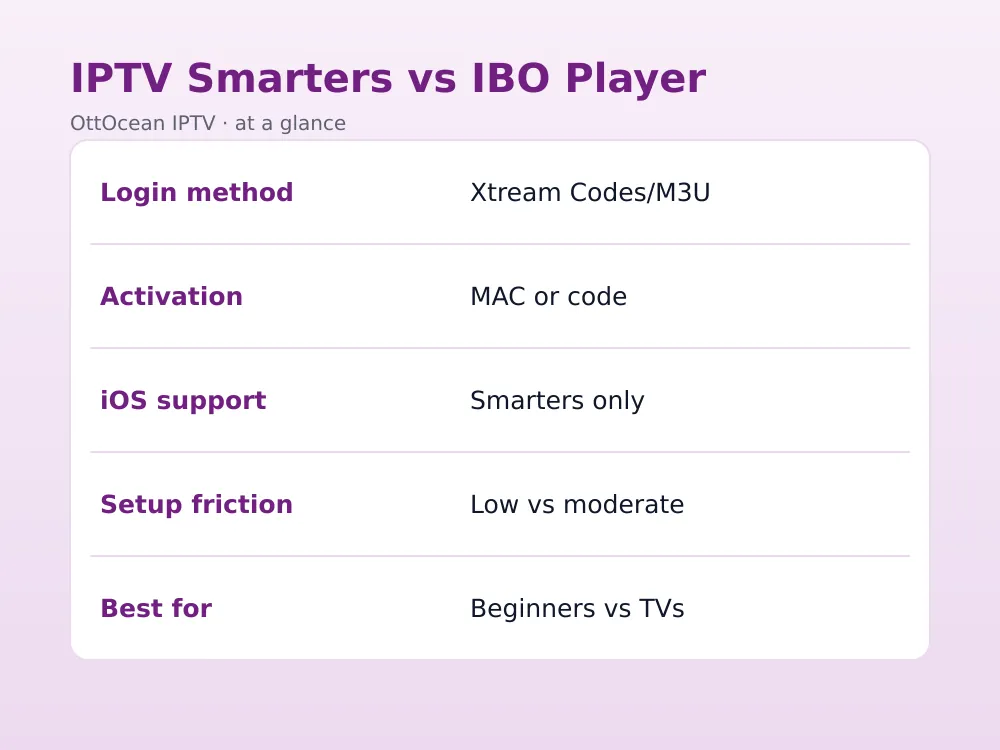
| Factor | IPTV Smarters Pro | IBO Player |
|---|---|---|
| Login method | Xtream Codes/M3U direct | MAC or activation code |
| Platforms | iOS, Android, Fire TV, Smart TV | Smart TV, Android TV |
| Setup friction | Low | Moderate |
| iOS support | Yes | No |
| Interface on 4K TVs | Good | Very clean |
Key takeaways
- IPTV Smarters Pro logs in with a reusable Xtream Codes username and password
- IBO Player requires a MAC address or purchased activation code before first login
- IPTV Smarters Pro supports iPhone and iPad; IBO Player does not
- IBO Player’s interface is often cleaner and lighter on mid-range Smart TVs
- Both accept OttOcean IPTV’s standard Xtream Codes and M3U credentials once set up
- IPTV Smarters Pro updates more frequently across more app stores
- Beginners on any device should start with IPTV Smarters Pro for the simplest setup
FAQ: Iptv Smarters Vs Ibo Player
Which is easier to set up, IPTV Smarters Pro or IBO Player?
IPTV Smarters Pro is easier for most people because it logs in directly with an Xtream Codes username, password and server URL, the same three fields OttOcean IPTV emails at signup. IBO Player needs a MAC address or activation code registered first, which adds an extra step before the first login works.
Does IBO Player work on iPhone?
No. IBO Player is built for Smart TVs and Android TV boxes and has no iOS release. iPhone and iPad users on an OttOcean IPTV subscription should use IPTV Smarters Pro instead, which is available directly on the Apple App Store and logs in with the same Xtream Codes credentials.
Can I use the same OttOcean IPTV login on both apps?
Yes. Once IBO Player is activated on a device, both apps accept the same Xtream Codes API details or M3U link from OttOcean IPTV, so you can compare them side by side on the same TV without requesting a second set of credentials from support.
Why does IBO Player need a MAC address?
MAC-based activation ties the app to one physical device, a model some Smart TV app developers use instead of a username-and-password login. It is not unique to IBO Player, but it does mean the activation step is tied to that specific TV rather than portable across every screen you own.
Which app has better picture quality?
Picture quality depends on the stream from OttOcean IPTV’s servers, not the player app, so both apps display identical 4K, FHD or HD quality for the same channel. The difference between iptv smarters vs ibo player is in interface and login convenience, not video decoding, buffering behavior, or resolution once a channel is playing on either device.
Is IBO Player safe to use with OttOcean IPTV?
Yes, when downloaded from your TV’s official app store or a trusted source. IBO Player is simply a playback client; it does not host or control the content stream, which comes entirely from your OttOcean IPTV subscription and its Xtream Codes API.
What is the best iptv app for smart tv overall?
For most Samsung and LG owners, IPTV Smarters Pro is the best iptv app for smart tv because it needs no separate activation and reuses the same xtream codes login as every other device in the house. IBO Player remains a strong second choice if you specifically want its lighter, TV-only interface.
Conclusion: Our Recommendation
For most OttOcean IPTV customers, IPTV Smarters Pro is the safer starting point in the iptv smarters vs ibo player decision: broader platform support, a reusable Xtream Codes login, and no activation friction. IBO Player remains a solid second option specifically on Samsung and LG Smart TVs where its lighter interface stands out.
Not sure which fits your setup? Start a 5-day OttOcean IPTV free trial, no credit card required, and try both apps with the same login before choosing. When you are ready, compare our full OttOcean IPTV plans and pricing to pick the right device count for your household.
One honest limitation: app store availability and activation steps change over time on both sides, so always confirm current install instructions for your exact TV model. As with any IPTV setup, you are responsible for the content and channels you access through your subscription.
Neither app is affiliated with or built by OttOcean IPTV; both are independent playback clients that display whatever a valid Xtream Codes or M3U subscription sends them. If you ever see buffering or missing channels, check the source subscription and your home internet connection before assuming the app itself is at fault, since in most support cases the player is not the bottleneck.
Whichever app you settle on, keep your Xtream Codes details somewhere safe, since re-entering them on a second device or after a factory reset is a two-minute task with either player. OttOcean IPTV’s support team can resend your login by WhatsApp or email if you ever misplace it.