
Last updated: September 22, 2026
If you have ever set up a MAG box and been asked for a “portal URL” instead of a username and password, you were looking at stalker portal iptv, one of the oldest and still most widely deployed IPTV middleware systems in the industry today. It works completely differently from the Xtream Codes and M3U logins most modern apps use, which trips up a lot of first-time buyers.
On this page
- What Is Stalker Portal IPTV? Understanding the Middleware
- Portal URL + MAC Address IPTV Login: How It Actually Works
- Ministra TV Platform: From Stalker to Modern Middleware
- Which Apps Support Stalker Portal IPTV (and Which Don’t)
- Xtream Codes vs Stalker Portal: Key Differences
- Common Stalker Portal IPTV Errors and Fixes
- Does OttOcean IPTV Support Stalker Portal Login?
- Setting Up an IPTV Login on a MAG or Formuler Box
- Stalker Portal IPTV: Is It Still Worth Using in 2026?
- Key takeaways
- FAQ: stalker portal iptv
- Final Verdict
What we checked: we researched how Stalker/Ministra middleware authenticates devices compared with Xtream Codes and M3U, reviewed which current apps and boxes support it natively, and compiled the most common setup errors reported by MAG and Formuler users across support forums.
What Is Stalker Portal IPTV? Understanding the Middleware
This middleware refers to a server-side system originally built by Infomir, the same company behind MAG set-top boxes, to manage channel lists, EPG data, VOD catalogs, and subscriber accounts for IPTV providers. Instead of a simple playlist file, it runs a full portal application that the receiving device loads and displays.
The name “Stalker” comes from the original middleware brand; the technology has since been renamed and continued as this modern middleware, though “Stalker portal” remains the term most resellers, forums, and box menus still use out of habit. Functionally, the two names describe the same lineage of software.
The software originated in the early 2010s, well before Xtream Codes became the dominant reseller panel it is today, which is part of why so much older set-top box hardware, including early MAG models, was built around this portal-first approach rather than a simple credential-based login. Newer firmware on the same hardware families has since added other login formats alongside it.
Unlike Xtream Codes or a plain M3U file, this middleware builds an entire interactive menu system, complete with live TV, VOD, and sometimes catch-up, all rendered by the portal server and displayed inside the receiving box’s built-in Stalker client app.
Portal URL + MAC Address IPTV Login: How It Actually Works
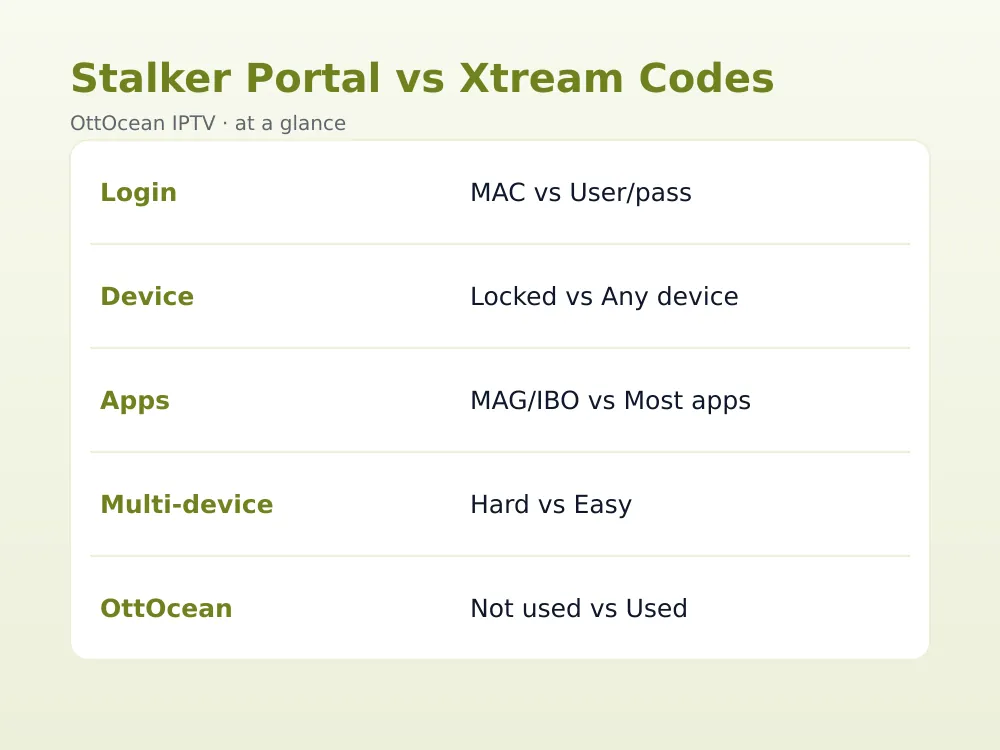
Instead of a username and password, this middleware authenticates using two pieces of information: a portal URL, pointing to the provider’s server, and the device’s MAC address, a unique hardware identifier burned into the box at manufacture. There is no login screen to type credentials into; the box simply reports its MAC address, sent automatically.
This hardware-based login method means your subscription is tied directly to one physical device. If that box breaks or you want to add a second one, the provider typically needs to register the new MAC address on their server before it will authenticate, unlike an Xtream Codes username and password that works on any device.
A MAC address, as Wikipedia explains, is a hardware identifier assigned to a network interface at manufacture, which is precisely why it makes a workable, if inflexible, login credential: it is unique and cannot easily be changed on most consumer set-top box hardware.
From the provider’s side, this authentication method has one clear operational upside: it prevents casual account sharing, since a subscription simply will not authenticate on a second, unregistered device the way a leaked username and password sometimes can on other systems. That built-in restriction is a feature for the provider and a limitation for the subscriber, depending on which side of the transaction you are on.
- Portal URL: the server address the box connects to, provided by your IPTV reseller
- MAC address: a unique 12-character hardware ID (like 00:1A:79:XX:XX:XX) tied to one specific device
- No username or password field exists in this classic login system; MAC-based authentication happens fully automatically
Ministra TV Platform: From Stalker to Modern Middleware
This officially supported, continually updated version of the original Stalker middleware is still maintained by Infomir for IPTV providers and resellers running subscriber management, EPG, and VOD infrastructure. Most references to “Stalker portal” in 2026 are actually describing a provider running this same modern platform under the hood.
For providers, this platform adds features the original Stalker software lacked: better VOD management, more flexible subscription tiers, and improved compatibility with modern set-top box firmware. For subscribers, none of this changes the day-to-day experience much; you still connect using a portal URL and a MAC-based device login rather than a conventional username and password.
Infomir continues to release updates to this platform specifically for the hospitality and reseller markets, where a provider might be managing thousands of registered devices across hundreds of hotel rooms or client accounts at once. That scale of device management is a genuinely different problem than a single household juggling two or three streaming boxes.
| System | Login Method | Tied To | Common Apps |
|---|---|---|---|
| Stalker Portal / Ministra TV Platform | Portal URL + MAC address | One physical device | MAG, Formuler, IBO, XCIPTV |
| Xtream Codes API | Username + password + server URL | Any device, multiple at once | IPTV Smarters Pro, TiviMate |
| M3U Playlist | Single playlist URL | Any device | Nearly every IPTV app, Kodi, VLC |
Which Apps Support Stalker Portal IPTV (and Which Don’t)
Support for this middleware is narrower than for Xtream Codes or M3U. Apps and boxes that do support it natively include MAG devices (Infomir), Formuler boxes running their built-in portal client, IBO Player and IBO Pro Player, Duplex Play, and XCIPTV Player’s Pro tier, which added Stalker/Ministra portal support alongside its standard Xtream login.
Two of the most popular general-purpose IPTV apps do not support it at all: IPTV Smarters Pro has no native Stalker/Ministra portal option, and neither does TiviMate, despite both being extremely common on Fire TV and Android TV. Both apps are built entirely around Xtream Codes API and M3U formats instead.
- Supports Stalker/Ministra portal: MAG boxes, Formuler boxes, IBO Player, IBO Pro Player, Duplex Play, XCIPTV Pro
- Does NOT support Stalker/Ministra portal: IPTV Smarters Pro, TiviMate, OTT Navigator (M3U/Xtream only)
- If your provider only offers a portal URL and MAC-based login, your app choice narrows considerably
Xtream Codes vs Stalker Portal: Key Differences
The core difference between these two login systems is authentication and portability. Xtream Codes uses a username, password, and server URL that works on any supported app or device, and the same login can often run on multiple devices simultaneously depending on your plan. The MAC-based system ties the subscription to one device, making device swaps and multi-device use noticeably more friction.
Weighing app compatibility between the two systems, Xtream Codes is the clear winner: it works in TiviMate, IPTV Smarters Pro, OTT Navigator, and nearly every modern IPTV player, while the MAC-based portal only works in a shorter list of Stalker-aware apps and dedicated boxes. Our M3U vs Xtream Codes guide covers the login-format comparison in more depth.
One advantage this older system still holds in some deployments: because the portal renders its own full interface server-side, hotel and hospitality installations sometimes prefer it for tighter control over branding and channel lists across many identical boxes at once, a scenario Xtream Codes was never really designed for.
Common Stalker Portal IPTV Errors and Fixes
“Fetching profile failed” is the most common error with this login system, usually meaning the portal URL is wrong, the server is down, or the box has no internet connection at that moment. Double-check the exact URL your provider gave you, including the correct port number if one was specified.
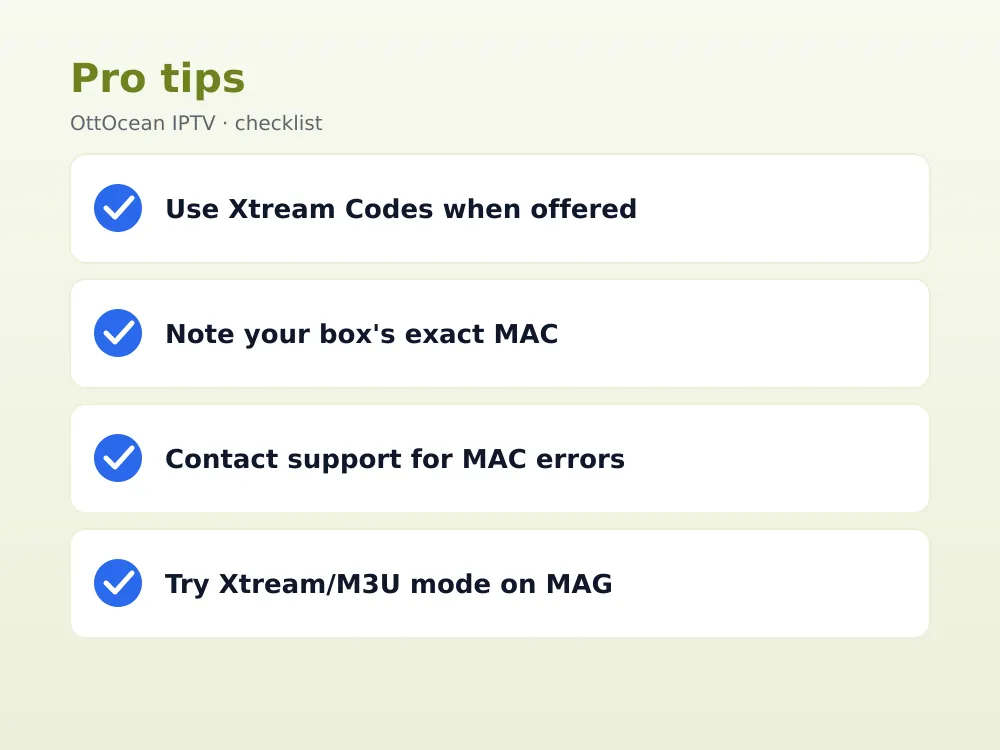
“MAC address not found” or “MAC already in use” errors mean the MAC-based login has not been registered on the provider’s server, or is already active on another account. Contact your reseller with your device’s exact MAC address, found in the box’s system settings, to have it added or reset.
A blank or frozen portal screen after a successful connection often points to a token or session expiration on the provider’s server rather than a problem with the box itself; restarting the app or power-cycling the device usually forces a fresh authentication attempt.
Slow channel loading, as opposed to an outright failure, is usually a bandwidth or server-load issue rather than an authentication problem, since the portal has already confirmed the device and is simply rendering a large channel and EPG list. Clearing the app’s cache from the box’s system settings can speed this up on older, memory-constrained hardware.
If none of these fixes resolve the issue, the most reliable next step is contacting your provider’s support directly with your exact device model, firmware version, and the precise error message on screen, since MAC-based troubleshooting almost always requires server-side account access that a subscriber cannot fix alone.
Does OttOcean IPTV Support Stalker Portal Login?
Here is the honest answer: OttOcean IPTV issues an Xtream Codes API login and an M3U URL, not a classic Stalker/Ministra MAC-address login. This is a deliberate choice, since Xtream Codes and M3U work across far more apps and devices, including iPhone, Windows, Mac, and every major streaming box, without tying your subscription to a single MAC address.
If you own a MAG or Formuler box and specifically want to use it, the good news is most current MAG and Formuler firmware also includes an Xtream Codes or M3U entry option alongside its classic Stalker portal mode, reachable from the same settings menu. Our IPTV on MAG box guide shows exactly where to find it.
In practice, this means OttOcean IPTV subscribers with MAG or Formuler hardware simply enter the Xtream Codes login in that alternate mode instead of using the box’s native Stalker/Ministra MAC authentication, getting the same device compatibility as any other supported box or app.
Setting Up an IPTV Login on a MAG or Formuler Box
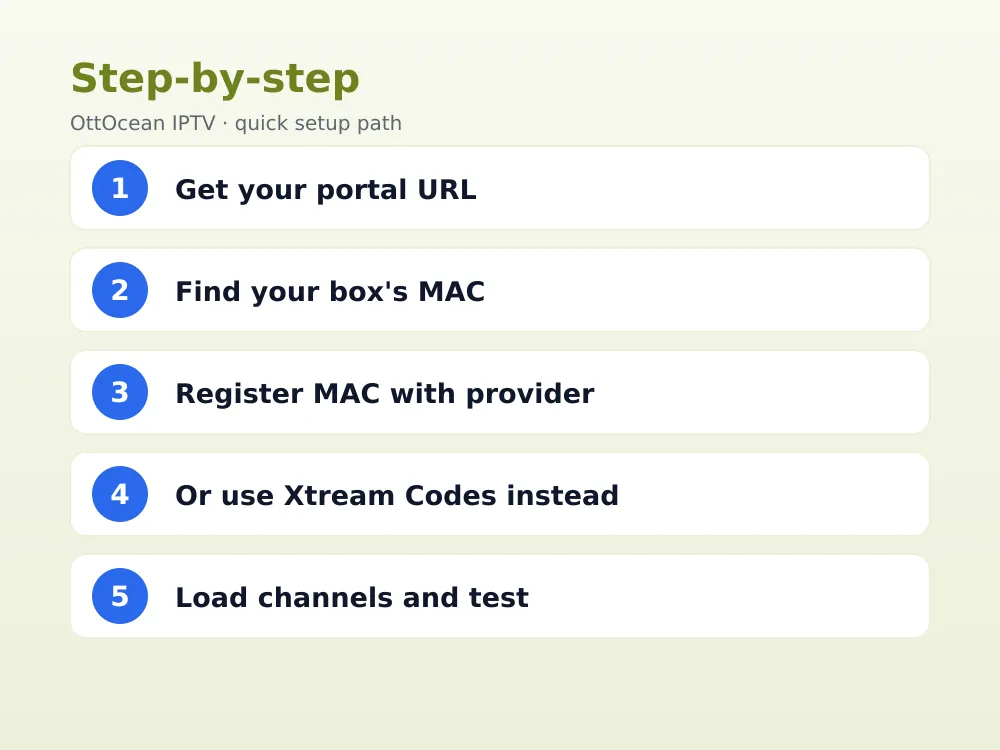
To set up OttOcean IPTV on a MAG box, open Settings, find the Servers or Portals menu, and look for an option to add a new server using Xtream Codes credentials or an M3U URL rather than the default Stalker portal field. Enter the server URL, username, and password exactly as provided at signup.
On a Formuler box, the process is similar: open the built-in portal manager, choose “Add Xtream” or “Add M3U” instead of a classic Stalker portal entry, and paste in your OttOcean IPTV details. Both box families support this dual-mode setup on firmware released within the last several years.
If your specific box model is old enough that it lacks this alternate login mode entirely, checking for a firmware update from the manufacturer’s official site before giving up is worth the ten minutes it takes; most manufacturers added Xtream and M3U support to their firmware line-ups years ago, even on otherwise older hardware still in daily household use today.
- Open your box’s Settings or Portal Manager menu
- Choose “Xtream Codes” or “M3U” rather than the classic Stalker portal option
- Enter your OttOcean IPTV server URL, username, and password (or M3U link)
- Save and let the box load channels; no MAC address registration is needed for this method
Stalker Portal IPTV: Is It Still Worth Using in 2026?
This MAC-based system still has a place in hospitality and reseller deployments where centralized, server-rendered control over many identical boxes matters more than device flexibility. For an individual household subscriber, though, it offers little advantage over Xtream Codes or M3U, and its MAC-locked login makes switching devices more of a hassle.
If you are shopping for an IPTV subscription and a provider only offers this MAC-locked login with no Xtream Codes or M3U alternative, ask directly whether a more flexible login format is available, since most reputable providers, OttOcean IPTV included, support the broader-compatibility options by default in 2026.
Key takeaways
- Stalker portal iptv is middleware, now maintained as the Ministra TV Platform, authenticating by MAC address rather than username/password
- A MAC address iptv login ties the subscription to one physical device, unlike Xtream Codes or M3U
- MAG, Formuler, IBO Player, Duplex Play, and XCIPTV Pro support it natively; IPTV Smarters Pro and TiviMate do not
- In the xtream codes vs stalker portal comparison, Xtream Codes wins on app compatibility and multi-device flexibility
- OttOcean IPTV issues Xtream Codes and M3U logins, not a Stalker MAC login, for broader device support
- MAG and Formuler owners can still use OttOcean IPTV via the box’s alternate Xtream/M3U entry mode
- Overall, stalker portal iptv remains relevant mainly for hospitality and reseller deployments in 2026
FAQ: stalker portal iptv
What is a MAC address iptv login used for?
A MAC address iptv login authenticates a device using its unique hardware identifier instead of a username and password, which is how classic Stalker/Ministra systems work. The provider registers that specific MAC address on their server, so only that exact box can connect, unlike Xtream Codes credentials that work on any supported device.
Does IPTV Smarters Pro support Stalker portal login?
No. IPTV Smarters Pro is built entirely around Xtream Codes API and M3U playlist formats and has no native Stalker/Ministra portal option. If your provider only offers a MAC-based login, you would need a Stalker-aware app like IBO Player or a MAG/Formuler box instead of IPTV Smarters Pro.
What is the Ministra TV Platform?
The Ministra TV Platform is the current, actively maintained version of the middleware originally branded Stalker, developed by Infomir for IPTV providers to manage subscriber accounts, EPG, and VOD. Most deployments like this in 2026 run on Ministra TV Platform infrastructure, even though the older “Stalker” name is still commonly used.
Xtream Codes vs stalker portal: which should I choose?
For most households, Xtream Codes wins the xtream codes vs stalker portal comparison, since it works across far more apps and devices and is not locked to a single MAC address. The MAC-based system can still make sense for hospitality installations or dedicated MAG/Formuler setups where centralized control matters more than flexibility.
Why do I get “MAC address not found” on my MAG box?
This error means the provider’s server has not registered your box’s specific MAC address for this type of account, or a typo exists in the portal URL. Check the MAC address in your box’s settings menu and confirm both the URL and MAC match exactly what your reseller has on file.
Can I use OttOcean IPTV with a Stalker-only device?
Yes, indirectly. OttOcean IPTV provides Xtream Codes and M3U logins rather than a classic MAC-based login, but most current MAG and Formuler boxes include an alternate Xtream/M3U entry mode in their settings menu, letting you use OttOcean IPTV on that hardware without needing native Stalker portal support.
Final Verdict
Stalker portal iptv is older technology, still alive today as the Ministra TV Platform, built around a portal URL and MAC address iptv login rather than a conventional username and password. It works well inside its narrower app ecosystem but loses to Xtream Codes and M3U on flexibility, multi-device support, and setup simplicity for most everyday households.
If you want the widest device compatibility without worrying about MAC address registration, start with OttOcean IPTV’s 5-day free trial, no credit card required, which hands you an Xtream Codes login that works across phones, Smart TVs, and streaming boxes alike, with no hardware lock-in; compare plans on the IPTV subscription plans page whenever you are ready to commit.


